So far, we've learned Prefix Sum for answering range queries efficiently and Difference Arrays for performing range updates efficiently. But what if the problem is something like this?
Find the maximum sum of any 3 consecutive elements.
Find the longest substring without repeating characters.
Find the smallest subarray whose sum is at least a target value.
Can Prefix Sum solve all of these?
Not really.
The problem here is that the range keeps moving.
Instead of calculating everything from scratch every time, we can simply slide the previous answer one step forward.
That's exactly what the Sliding Window Technique does.
Think of a train moving along a railway track. Instead of rebuilding the train every time it moves, it simply moves one station ahead. One passenger gets off, another gets on, and the journey continues.
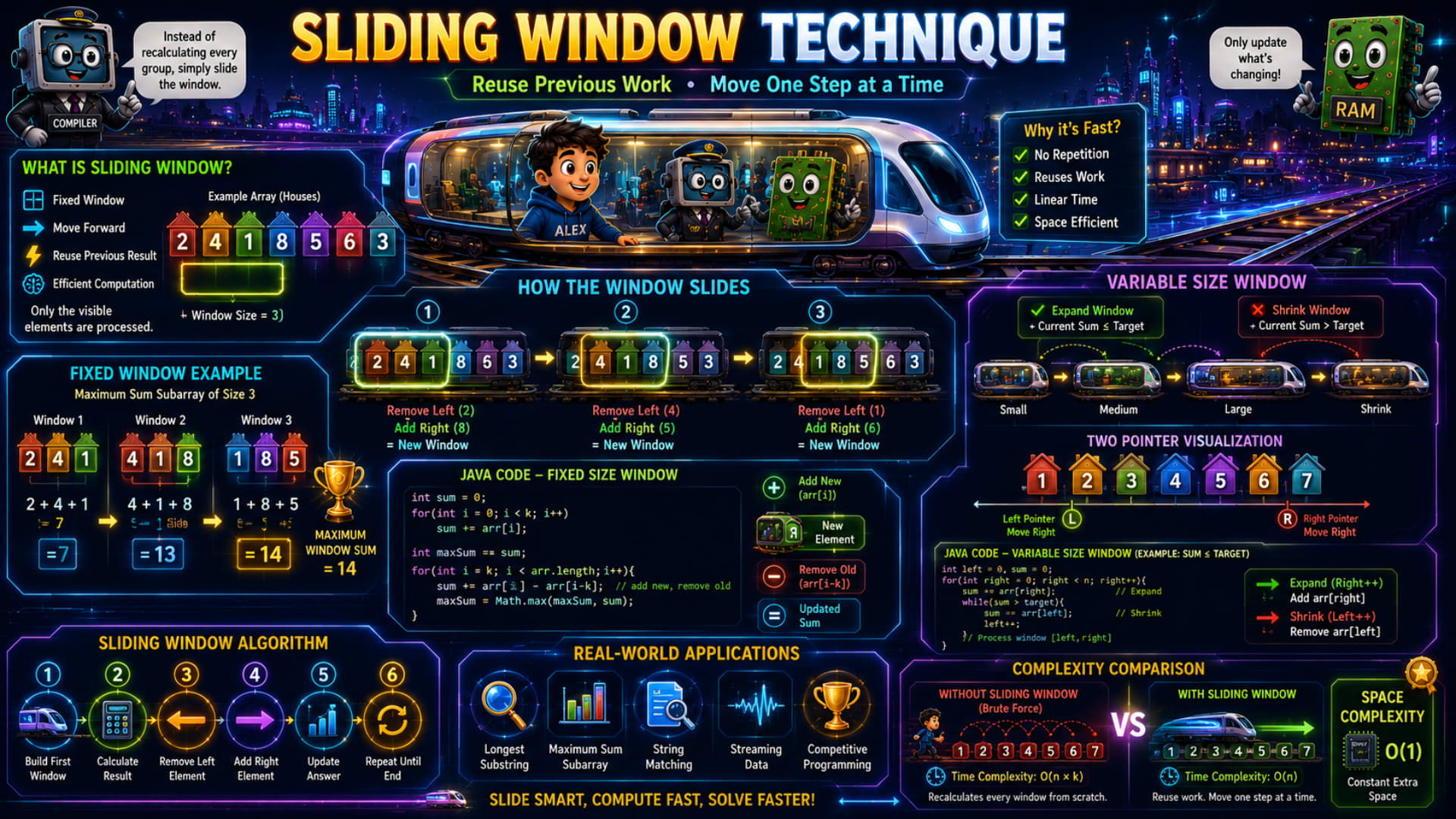
The infographic explains this beautifully using a moving train, fixed-size windows, variable-size windows, and Java examples. Let's understand every part step by step.
What is Sliding Window?
The infographic defines Sliding Window using four simple ideas.
Fixed Window
Move Forward
Reuse Previous Result
Efficient Computation
The most important sentence is:
Instead of recalculating every group, simply slide the window.
Imagine an array:
2 4 1 8 5 6 3
Suppose our window size is:
3
Instead of considering the whole array,
we only look at three consecutive elements at a time.
Like looking through a small window.
Initially the window sees:
2 4 1
Then it moves one step.
Now it sees:
4 1 8
Then again,
1 8 5
The window keeps moving until it reaches the end of the array.
Why Do We Need Sliding Window?
Suppose someone asks:
Find the maximum sum subarray of size 3.
A beginner usually writes:
2+4+1

4+1+8

1+8+5

8+5+6

5+6+3
Every time,
three numbers are added again.
Notice something.
When moving from
2 4 1
to
4 1 8
the numbers
4
1
are already common.
Only two things changed.
2 disappeared.
8 entered.
So why calculate everything again?
Sliding Window reuses the previous calculation.
Fixed Size Sliding Window
The infographic first explains the Fixed Window.
This means the window size never changes.
Suppose:
Window Size = 3
Array:
2 4 1 8 5 6 3
The window always contains exactly three elements.
Understanding the Fixed Window Example
The infographic shows three windows.
Window 1
2 4 1
Sum:
2 + 4 + 1 = 7
Window 2
Instead of calculating:
4 + 1 + 8
from scratch,
Sliding Window says:
Remove:
2
Add:
8
Previous Sum:
7
New Sum:
7 - 2 + 8

=

13
Exactly the same answer,
but with much less work.
Window 3
Current window:
1 8 5
Again,
don't calculate everything.
Previous Sum:
13
Remove:
4
Add:
5
New Sum:
13 - 4 + 5

=

14
The infographic correctly shows:
Maximum Window Sum = 14
Instead of recomputing every sum,
we simply update the previous answer.
How the Window Slides
The center of the infographic illustrates this perfectly.
Step 1
Window:
2 4 1
Step 2
Remove Left:
2
Add Right:
8
New Window:
4 1 8
Step 3
Remove:
4
Add:
5
New Window:
1 8 5
This continues until the window reaches the end of the array.
Notice that every move changes only two elements.
That's the secret behind Sliding Window.
Java Code for Fixed Size Sliding Window
The infographic provides the algorithm. Here's the Java version.
int k = 3;
int sum = 0;

// Build first window
for (int i = 0; i < k; i++) {
    sum += arr[i];
}

int maxSum = sum;

// Slide the window
for (int i = k; i < arr.length; i++) {

    sum += arr[i];       // Add new element

    sum -= arr[i - k];   // Remove old element

    maxSum = Math.max(maxSum, sum);
}
Let's understand it.
First,
we calculate the first window normally.
After that,
every new window performs only two operations.
sum += arr[i];
adds the new element entering the window.
Then,
sum -= arr[i-k];
removes the old element leaving the window.
That's it.
No recalculation.
Why is Sliding Window Fast?
The infographic highlights four reasons.
No Repetition
Previously calculated values are reused.
Reuses Work
Only update what's changing.
Don't calculate everything again.
Linear Time
Every element enters the window once.
Every element leaves once.
Total work becomes linear.
Space Efficient
No extra arrays are required.
Only a few variables are used.
Variable Size Sliding Window
Now comes another interesting variation.
Sometimes,
the window size isn't fixed.
Instead,
it keeps expanding and shrinking.
The infographic calls this:
Variable Size Window
Imagine searching for the smallest subarray whose sum is greater than a target.
Initially,
the window is small.
If the current sum is too small,
expand the window.
If the sum becomes too large,
shrink the window.
The window keeps changing its size until the required condition is satisfied.
Two Pointer Visualization
The infographic uses two pointers.
L ---------------- R
Both start at the beginning.
Expand
Move the Right pointer.
The window becomes larger.
Shrink
Move the Left pointer.
The window becomes smaller.
This simple idea is used in many interview questions.
Java Code for Variable Size Sliding Window
The infographic provides a generic algorithm.
Here's the Java version.
int left = 0;
int sum = 0;

for (int right = 0; right < arr.length; right++) {

    sum += arr[right];     // Expand

    while (sum > target) {

        sum -= arr[left];  // Shrink

        left++;
    }

    // Process current window
}
Let's understand it.
Whenever the window becomes too large,
remove elements from the left.
Whenever it's too small,
keep expanding from the right.
This continuous expansion and shrinking allows us to solve many problems efficiently.
Sliding Window Algorithm
The infographic summarizes the complete process.
Step 1
Build the first window.
Step 2
Calculate its result.
Step 3
Remove the left element.
Step 4
Add the new right element.
Step 5
Update the answer.
Step 6
Repeat until the end.
Almost every Sliding Window problem follows this pattern.
Complexity Comparison
The infographic compares two approaches.
Without Sliding Window
Suppose:
Window Size = k
Every window recalculates all k elements.
Time Complexity:
O(n × k)
With Sliding Window
Every element enters once.
Every element leaves once.
Time Complexity:
O(n)
This is a huge improvement, especially when k is large.
Space Complexity
The infographic shows:
O(1)
Only a few variables like:
sum
left
right
maxSum
are needed.
No additional array is created.
Real-World Applications
The infographic highlights several practical uses.
Longest Substring
Problems like:
Longest substring without repeating characters
use a variable-size sliding window.
Maximum Sum Subarray
One of the most common fixed-size Sliding Window problems.
String Matching
Finding patterns inside large strings often uses Sliding Window techniques.
Streaming Data
When processing live sensor data, stock prices, or network traffic, only the most recent values are kept inside the window instead of processing the entire history repeatedly.
Competitive Programming
Sliding Window appears frequently because it converts many brute-force solutions into efficient linear-time algorithms.
Advantages of Sliding Window
The infographic emphasizes why this technique is so powerful.
Faster Execution
Instead of recalculating every window, previous computations are reused.
Less Repetition
Only the elements entering and leaving the window are processed.
Linear Time
Many problems improve from O(n × k) to O(n).
Constant Extra Space
Most Sliding Window solutions use only a few variables.
A Few Important Things to Know
There are a few important concepts that aren't explicitly shown in the infographic:
Fixed-size and variable-size windows solve different types of problems. Fixed windows are used when the window length is known (e.g., maximum sum of size
k), while variable windows are used when the window size depends on a condition (e.g., smallest subarray with sum ≥ target).Variable-size Sliding Window usually works when the window can be adjusted using two pointers. Many of these problems involve positive numbers or conditions that become easier to maintain by expanding and shrinking the window.
Not every array problem can use Sliding Window. The technique is applicable only when consecutive elements (a contiguous subarray or substring) are involved.
Sliding Window is often combined with HashMaps or HashSets, especially for string problems like finding the longest substring without repeating characters.
Conclusion
The Sliding Window Technique is one of the most effective optimization techniques for solving problems involving contiguous subarrays or substrings. Instead of recalculating every window from scratch, it intelligently reuses previous work by removing the element leaving the window and adding the new element entering it. This simple idea reduces unnecessary computations and often improves the time complexity from O(n × k) to O(n). Whether you're solving maximum sum problems, substring questions, streaming data tasks, or competitive programming challenges, mastering Sliding Window will help you write faster and more efficient algorithms.
Quick Revision
Concept | Remember |
|---|---|
Sliding Window | Move a window over consecutive elements while reusing previous calculations. |
Fixed Window | Window size remains constant. |
Variable Window | Window expands or shrinks based on a condition. |
Update Rule | Remove left element, add right element. |
Two Pointers | Left pointer shrinks, Right pointer expands. |
Without Sliding Window | Recalculate every window → O(n × k) |
With Sliding Window | Reuse previous work → O(n) |
Space Complexity | O(1) |
Applications | Maximum sum subarray, longest substring, string matching, streaming data, competitive programming. |
Key Idea | Don't recompute the entire window—only update what's changed. |