So far, we've learned recursion, where a function keeps calling itself until it reaches the base case. Now comes one of the most interesting applications of recursion—Backtracking.
At first glance, backtracking might look difficult because people often associate it with tough problems like Sudoku, N-Queens, and Rat in a Maze. But the actual idea is surprisingly simple.
Imagine you're exploring a huge maze. At every junction, you choose a path. If that path leads to a dead end, you don't give up. Instead, you walk back to the previous junction and try another path. You keep repeating this process until you finally find the exit.
That's exactly what backtracking does.
It tries one possibility, checks whether it works, and if it doesn't, it goes back (backtracks) and tries another possibility.
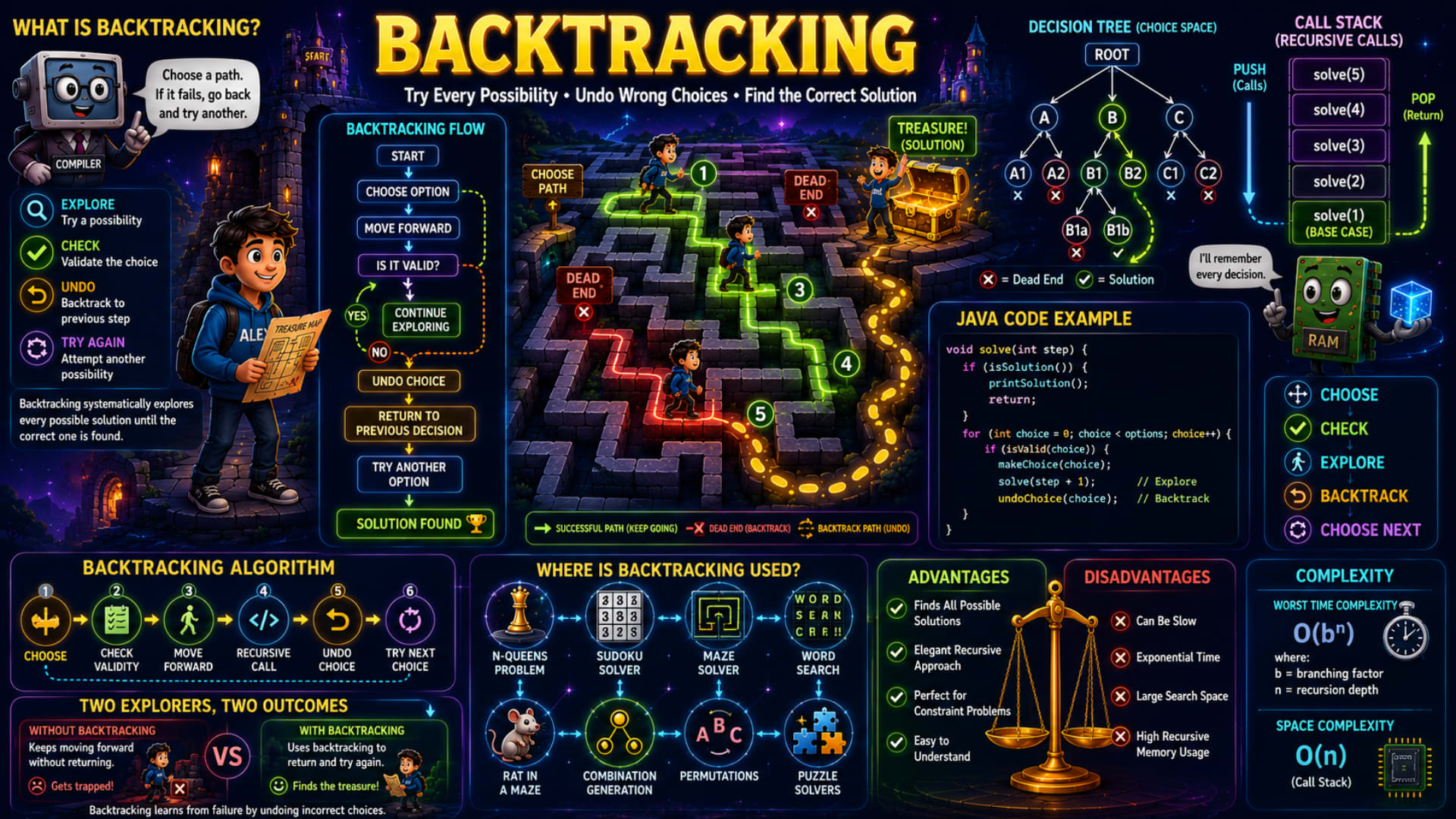
The infographic explains this concept beautifully using a treasure maze, decision tree, recursive call stack, and Java code. Let's understand every part step by step.
What is Backtracking?
The infographic defines backtracking as:
Choose a path. If it fails, go back and try another.
That's the easiest way to remember backtracking.
Unlike normal algorithms that follow only one path, backtracking explores multiple possibilities.
Whenever a choice turns out to be wrong, it simply undoes that choice and explores a different option.
This is why backtracking is often described as:
Trial and Error with Intelligence
Instead of randomly guessing, it systematically explores every possible solution until it finds the correct one.
The Four Basic Steps of Backtracking
The infographic highlights four simple actions.
1. Explore
Try one possible solution.
For example,
Suppose you're solving a maze.
You decide to move:
Right
instead of Left.
That is your first choice.
2. Check
Now verify whether the chosen path is valid.
Ask questions like:
Did I hit a wall?
Is this move allowed?
Am I violating any rule?
If the answer is Yes, continue.
Otherwise,
it's time to go back.
3. Undo (Backtrack)
This is the most important step.
If the current choice fails,
don't continue making wrong decisions.
Instead,
undo the last move.
Return exactly where you made that decision.
This process is called Backtracking.
4. Try Again
Now try another possibility.
Maybe instead of moving Right,
move Left.
Or Up.
Or Down.
Repeat the same process until the solution is found.
Understanding the Backtracking Flow
The infographic shows the complete algorithm flow.
Start
   ↓
Choose Option
   ↓
Move Forward
   ↓
Is it Valid?
Now two possibilities arise.
If YES
Continue Exploring
Keep solving the smaller problem recursively.
If NO
Undo Choice
      ↓
Return to Previous Decision
      ↓
Try Another Option
This cycle continues until:
Solution Found
This flow is the backbone of every backtracking algorithm.
Understanding the Maze Example
The treasure maze shown in the infographic is one of the best ways to understand backtracking.
Alex wants to reach the treasure.
At the beginning,
he chooses the green path.
That path keeps moving forward successfully.
But another path eventually reaches a Dead End.
Notice what Alex doesn't do.
He doesn't keep walking into the wall.
Instead,
he returns to the previous junction.
Then chooses another unexplored path.
Eventually,
after trying multiple routes,
he reaches the treasure.
This is exactly how recursive backtracking algorithms work.
They never assume the first choice is correct.
They simply keep trying until one path succeeds.
Decision Tree (Choice Space)
The infographic also introduces something called a Decision Tree.
Every decision creates multiple new possibilities.
Look at the tree.
            Root
          /   |   \
         A    B    C
From A,
more choices appear.
From B,
even more choices appear.
Every branch represents a decision.
Some branches end with:
❌ Dead End
while another branch reaches:
✅ Solution
Backtracking simply explores every branch one by one.
Whenever one branch fails,
it returns to its parent node and explores another branch.
This process is called Depth First Search (DFS) exploration because recursion always goes as deep as possible before coming back.
Understanding the Java Code
The infographic shows a generic backtracking algorithm. Let's rewrite it in Java and understand every line.
void solve(int step) {

    if (isSolution()) {
        printSolution();
        return;
    }

    for (int choice = 0; choice < options; choice++) {

        if (isValid(choice)) {

            makeChoice(choice);

            solve(step + 1);      // Explore

            undoChoice(choice);   // Backtrack
        }
    }
}
Now let's understand it.
First,
if (isSolution()) {
    printSolution();
    return;
}
This is the base case.
If we've already found the answer,
stop making further recursive calls.
Next,
for (int choice = 0; choice < options; choice++)
Suppose there are four possible choices.
The algorithm doesn't pick only one.
Instead,
it tries all four possibilities one by one.
Now comes the important check.
if (isValid(choice))
Not every choice is legal.
For example,
in Sudoku,
placing number 5 might violate the rules.
So,
we only continue if the move is valid.
Then,
makeChoice(choice);
Actually perform the move.
For example,
place a queen,
move inside the maze,
or choose a character.
Next,
solve(step + 1);
This is where recursion happens.
Solve the remaining smaller problem.
Finally,
undoChoice(choice);
This single line is what makes recursion become backtracking.
After returning,
we remove the previous choice,
restore the old state,
and try another possibility.
Without undoing,
future choices would be affected by previous ones.
Why Do We Undo Choices?
This is one question almost every beginner asks.
Imagine solving Sudoku.
You place:
5
inside a cell.
Later,
you realize that decision makes the puzzle impossible to solve.
If you don't erase that 5,
you can never test another number.
So,
before trying another value,
you must remove it.
That's exactly what:
undoChoice(choice);
does.
It restores the previous state.
Understanding the Call Stack
The infographic also shows the recursive call stack.
solve(5)

solve(4)

solve(3)

solve(2)

solve(1)
Every recursive call is stored inside memory.
When recursion goes deeper,
new function calls are pushed onto the stack.
After reaching the base case,
they begin popping one by one.
The RAM character reminds us that every recursive call consumes stack memory.
This is why deep recursion uses more memory than simple loops.
Complete Backtracking Algorithm
The infographic summarizes the algorithm in six simple steps.
Step 1
Choose a possible option.
Step 2
Check whether the choice is valid.
Step 3
Move forward.
Step 4
Call recursion for the remaining problem.
Step 5
Undo the current choice.
Step 6
Try the next available option.
Every backtracking problem follows this exact pattern.
Two Explorers, Two Outcomes
The infographic compares two explorers.
Without Backtracking
The explorer keeps moving.
Eventually,
he reaches a dead end.
Now he has no idea what to do.
Game over.
With Backtracking
The explorer reaches a dead end.
Instead of giving up,
he walks backward,
returns to the previous junction,
chooses another path,
and eventually finds the treasure.
This simple story perfectly explains the difference between normal searching and backtracking.
Where is Backtracking Used?
Backtracking is one of the most useful techniques in DSA.
The infographic lists several real-world applications.
N-Queens Problem
Place N queens on a chessboard so that no two queens attack each other.
If a queen causes a conflict,
remove it and try another position.
Sudoku Solver
Try filling numbers from 1 to 9.
If a number violates Sudoku rules,
erase it and try another.
Maze Solver
Explore every possible path.
Whenever a path reaches a dead end,
return and explore another path.
Word Search
Search for words inside a grid.
If the current path cannot complete the word,
go back and try another direction.
Rat in a Maze
Move through the maze.
If blocked,
return and explore another route.
Combination Generation
Generate all possible combinations of a given set.
Permutations
Generate every possible arrangement of elements.
For example,
ABC

ACB

BAC

BCA

CAB

CBA
Every arrangement is generated using backtracking.
Puzzle Solvers
Many logical games and puzzles rely heavily on backtracking to explore possible moves efficiently.
Advantages of Backtracking
The infographic lists several benefits.
Finds Every Possible Solution
Unlike greedy algorithms,
backtracking explores every valid possibility.
Elegant Recursive Approach
The recursive structure makes complex search problems surprisingly easy to implement.
Perfect for Constraint Problems
Whenever rules must be satisfied,
backtracking is often the best solution.
Examples include Sudoku, N-Queens, and Crossword puzzles.
Easy to Understand
Although it may seem advanced initially,
the overall idea is straightforward:
Choose → Check → Explore → Undo → Try Again.
Disadvantages of Backtracking
Like every algorithmic technique,
backtracking also has limitations.
Can Be Slow
Since many possibilities are explored,
execution time can become very large.
Exponential Time
The search space often grows exponentially as the input size increases.
Large Search Space
Some problems contain millions or even billions of possible combinations.
Exploring all of them takes significant time.
High Recursive Memory Usage
Every recursive call occupies stack memory,
so deep recursion can consume a lot of memory.
Time and Space Complexity
The infographic mentions:
Worst Time Complexity
O(bⁿ)
where:
b = branching factor (number of choices at each step)
n = recursion depth
Why is it exponential?
Imagine each decision has 2 choices.
Depth = 3
2 × 2 × 2 = 8 possibilities
Depth = 10
2¹⁰ = 1024 possibilities
Depth = 20
2²⁰ = 1,048,576 possibilities
As you can see, the number of possibilities grows extremely quickly, which is why backtracking can become slow for large inputs.
Space Complexity
The infographic shows:
O(n)
This comes from the recursive call stack.
At any moment,
the maximum number of active recursive calls equals the recursion depth.
So,
if the recursion goes 20 levels deep,
the call stack stores about 20 function calls.
A Few Important Things to Know
There are a few concepts related to backtracking that aren't explicitly shown in the infographic but are important to understand:
Backtracking is built on recursion. Almost every backtracking solution uses recursion because it naturally handles exploring choices and returning to previous states.
Pruning is an optimization technique where impossible or unnecessary paths are skipped early instead of exploring them completely. Good pruning can dramatically improve performance.
Backtracking does not always find the fastest solution first. Its goal is to systematically explore possibilities, not necessarily to optimize the search order.
State restoration is essential. Forgetting to undo a move (
undoChoice()) is one of the most common beginner mistakes and usually leads to incorrect results.
Conclusion
Backtracking is a powerful problem-solving technique that combines recursion with intelligent trial and error. Instead of committing to one path, it explores a choice, checks whether it is valid, and if not, returns to the previous decision to try another option. This ability to choose, explore, undo, and retry makes backtracking the perfect approach for problems involving multiple possibilities, such as Sudoku, N-Queens, maze solving, permutations, combinations, and many other search-based algorithms. Once you understand the simple pattern behind backtracking, many seemingly difficult DSA problems become much easier to approach.
Quick Revision
Concept | Remember |
|---|---|
Backtracking | Try a choice, and if it fails, undo it and try another. |
Core Steps | Choose → Check → Explore → Backtrack → Try Next. |
Base Case | Stop recursion when a valid solution is found (or all choices are exhausted). |
Decision Tree | Each branch represents a possible choice. |
Call Stack | Stores every active recursive call. |
Undo Step | Restores the previous state before exploring another path. |
Applications | Sudoku, N-Queens, Rat in a Maze, Word Search, Permutations, Combinations, DFS. |
Time Complexity | Worst case: O(bⁿ), where b is the branching factor and n is the recursion depth. |
Space Complexity | O(n) due to the recursive call stack. |
Key Idea | Don't fear wrong choices—undo them and keep exploring until the correct solution is found. |