If you've been learning programming, you've probably used arrays many times. You write something like:
int[] arr = {15, 20, 35, 42, 58, 71};
and everything works perfectly.
But have you ever wondered where these values are actually stored inside the computer?
How does the computer instantly know where arr[3] is?
Why can arrays access elements so quickly?
And why are insertion and deletion slower compared to reading an element?
The answer lies in something called Memory Representation.
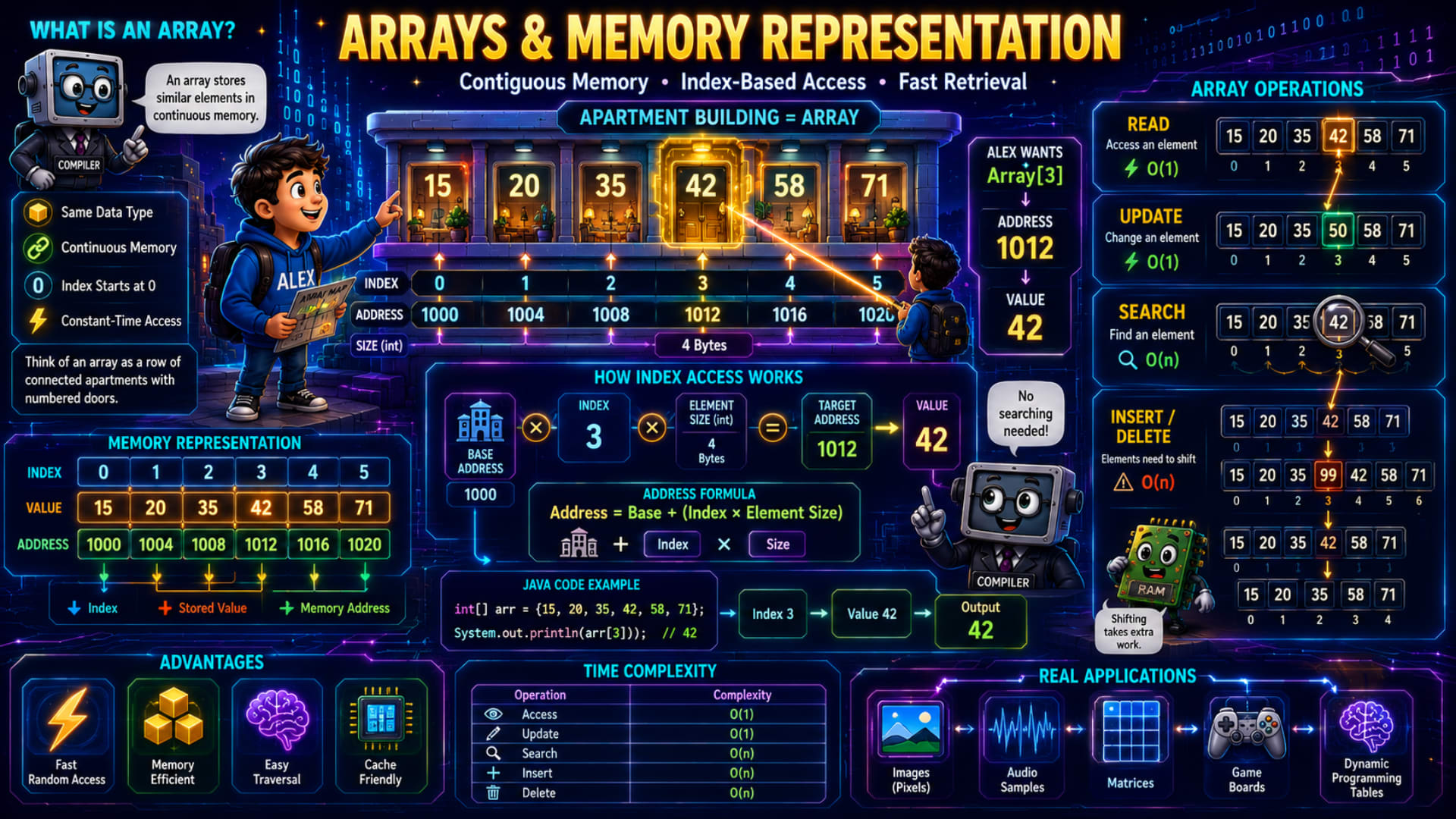
The infographic explains this concept using a beautiful apartment building analogy, where every apartment represents an element stored in memory. Once you understand this picture, arrays will never feel confusing again.
Let's understand every part step by step.
What is an Array?
The infographic defines an array as:
An array stores similar elements in continuous memory.
There are two important points here.
First,
an array stores similar data types.
For example,
int[] numbers = {15, 20, 35, 42, 58, 71};
Every element is an integer.
Similarly,
String[] names = {"Alex", "John", "Emma"};
stores only strings.
An array cannot mix different data types like integers, strings, and doubles together.
The second important point is:
Continuous Memory.
Unlike some other data structures,
all array elements are stored one after another in memory.
Think of it as six apartments built in one straight line.
Apartment 1
Apartment 2
Apartment 3
Apartment 4
Apartment 5
Apartment 6
There are no gaps between them.
This continuous arrangement is the main reason arrays are extremely fast.
The Apartment Building Analogy
The infographic compares an array with an apartment building.
Imagine each apartment stores one number.
15 20 35 42 58 71
Each apartment also has a number below it.
0 1 2 3 4 5
These numbers are called Indexes.
The index is not the stored value.
It simply tells us where the value is located.
For example,
Index:
3
contains
42
Whenever we write:
arr[3]
Java immediately returns
42
without checking any other element.
That's the biggest advantage of arrays.
Array Index Starts from 0
One thing every beginner notices is that arrays start from 0, not 1.
Why?
Because the index actually represents an offset from the starting memory address.
Suppose the first element starts at address:
1000
Then,
Index 0 means
Move:
0 positions
Index 1 means
Move:
1 element
Index 2 means
Move:
2 elements
and so on.
This makes address calculation extremely simple for the computer.
Understanding Memory Representation
The infographic shows three rows.
Index
0 1 2 3 4 5
Value
15 20 35 42 58 71
Address
1000

1004

1008

1012

1016

1020
Notice something.
Every address increases by:
4 bytes
Why?
Because the infographic assumes an integer occupies 4 bytes.
So,
if one integer needs four bytes,
the next integer starts four bytes later.
That's why the addresses become:
1000

1004

1008

1012

...
Alex Wants Array[3]
The infographic highlights this example.
Alex wants:
arr[3]
The computer immediately knows:
Address:
1012
Value:
42
Notice something amazing.
The computer didn't search through:
15
20
35
42
It jumped directly to the correct address.
This is called Random Access.
How Index Access Works
The infographic explains exactly how the computer calculates an address.
Suppose:
Base Address:
1000
Index:
3
Element Size:
4 bytes
The formula shown is:
Address = Base + (Index × Element Size)
Let's calculate it.
1000 + (3 × 4)

=

1000 + 12

=

1012
Exactly the address shown in the infographic.
Once the address is known,
the computer simply reads the value stored there.
Which is:
42
This calculation happens almost instantly, which is why array access is so fast.
Java Code Example
The infographic shows this example.
int[] arr = {15, 20, 35, 42, 58, 71};

System.out.println(arr[3]);
Let's understand it.
The array contains:
Index

0 → 15

1 → 20

2 → 35

3 → 42

4 → 58

5 → 71
When Java executes:
arr[3]
it immediately calculates the memory address,
retrieves the value,
and prints:
42
No searching is required.
Array Operations
The infographic explains four important operations.
Let's understand each one.
Read Operation
Reading means accessing an element.
Example:
System.out.println(arr[3]);
Output:
42
Since Java directly calculates the address,
reading takes:
O(1)
Constant time.
No matter whether the array has:
10 elements
100 elements
or
1 million elements,
reading any index still takes almost the same time.
Update Operation
Updating means changing an existing value.
Example:
arr[3] = 50;
Now the array becomes:
15

20

35

50

58

71
Again,
Java already knows where index 3 is located.
So updating also takes:
O(1)
Search Operation
Searching is different.
Suppose someone asks:
Find:
42
The computer doesn't know where 42 is stored.
It has to check:
15
20
35
42
until it finally finds the value.
In the worst case,
it might even check every element.
Therefore,
searching takes:
O(n)
Linear time.
Insert Operation
Now suppose we want to insert:
99
before:
42
The infographic shows this visually.
Current array:
15

20

35

42

58

71
After insertion:
15

20

35

99

42

58

71
But notice what happened.
42 had to move.
58 had to move.
71 had to move.
Every element after the insertion point shifts one position to the right.
That's why insertion takes:
O(n)
Delete Operation
Deletion works in the opposite direction.
Suppose we remove:
42
Now the array becomes:
15

20

35

58

71
But again,
58 moves left.
71 moves left.
Every remaining element shifts.
So deletion also takes:
O(n)
Why Arrays Are So Fast
The infographic highlights several advantages.
Let's understand them.
Fast Random Access
Because elements are stored continuously,
the address can be calculated directly.
No searching is required.
Memory Efficient
Arrays don't store extra pointers or references between elements.
Only the actual data is stored.
This makes arrays memory-efficient.
Easy Traversal
Suppose we want to print every element.
for (int i = 0; i < arr.length; i++) {
    System.out.println(arr[i]);
}
Since every element is stored one after another,
traversing an array is very simple.
Cache Friendly
This point isn't obvious from the infographic, but it's very important.
Modern CPUs load nearby memory locations together into a small, fast memory called the CPU Cache.
Because array elements are stored continuously,
accessing one element often brings the next few elements into the cache automatically.
This significantly improves performance when iterating through arrays.
Time Complexity Table
The infographic summarizes the complexity of array operations.
Let's understand why.
Operation | Time Complexity | Reason |
|---|---|---|
Read | O(1) | Direct address calculation using the index. |
Update | O(1) | Element location is already known. |
Search | O(n) | May need to check every element. |
Insert | O(n) | Elements after the insertion point must shift right. |
Delete | O(n) | Remaining elements must shift left. |
This table is one of the most important things to remember about arrays.
Real Applications of Arrays
The infographic also shows where arrays are used in real life.
Images
Every image is essentially a huge array of pixels.
Each pixel stores color information.
Audio Samples
Digital audio is stored as an array of sound samples.
Music players process these arrays continuously while playing songs.
Matrices
A matrix is simply a two-dimensional array.
Used heavily in mathematics,
computer graphics,
machine learning,
and scientific computing.
Game Boards
Games like Chess,
Tic-Tac-Toe,
Sudoku,
and Snake often store their boards using arrays.
Dynamic Programming
Many Dynamic Programming algorithms store intermediate answers inside arrays to avoid repeated calculations.
A Few Important Things to Know
There are a few important concepts that aren't explicitly shown in the infographic but are essential for understanding arrays:
Arrays have a fixed size. Once an array is created, its length cannot be changed. If you need a resizable collection in Java, you typically use an
ArrayList.Array indexes must stay within bounds. Accessing
arr[-1]orarr[arr.length]causes anArrayIndexOutOfBoundsException.Multi-dimensional arrays (like
int[][]) are commonly used to represent tables, grids, and matrices.Arrays store elements of the same type. This allows the compiler to know the size of each element and calculate memory addresses efficiently.
Conclusion
Arrays are one of the most fundamental data structures because they provide extremely fast access to elements through indexing. Their secret lies in storing data in contiguous memory locations, allowing the computer to calculate an element's address directly instead of searching for it. While reading and updating elements are very efficient with O(1) time complexity, operations like searching, inserting, and deleting can be slower because they may require scanning or shifting elements. Understanding how arrays are stored in memory forms the foundation for learning many advanced data structures and algorithms.
Quick Revision
Concept | Remember |
|---|---|
Array | Stores elements of the same data type in contiguous memory. |
Index | Starts from 0 and identifies an element's position. |
Memory Formula | Address = Base + (Index × Element Size) |
Read | Direct access using index → O(1) |
Update | Change value at an index → O(1) |
Search | Scan elements one by one → O(n) |
Insert/Delete | Requires shifting elements → O(n) |
Advantages | Fast access, memory efficient, easy traversal, cache friendly. |
Applications | Images, audio samples, matrices, game boards, dynamic programming. |
Key Idea | Continuous memory is what makes arrays fast. |