Whenever we write programs, we usually work with numbers like 5, 10, 100, or 1000. But have you ever wondered how the computer actually stores these numbers?
The answer is surprisingly simple.
A computer doesn't understand decimal numbers. It only understands bits, where every bit can be either 0 or 1.
Every number, character, image, video, and even this tutorial you're reading right now is ultimately stored as millions of 0s and 1s.
Now imagine if we could directly control these individual bits instead of working with whole numbers.
That's exactly what Bit Manipulation is.
It allows us to turn individual bits ON or OFF, flip them, check them, shift them, and perform extremely fast operations. Because these operations happen directly at the hardware level, they're among the fastest operations a CPU can perform.
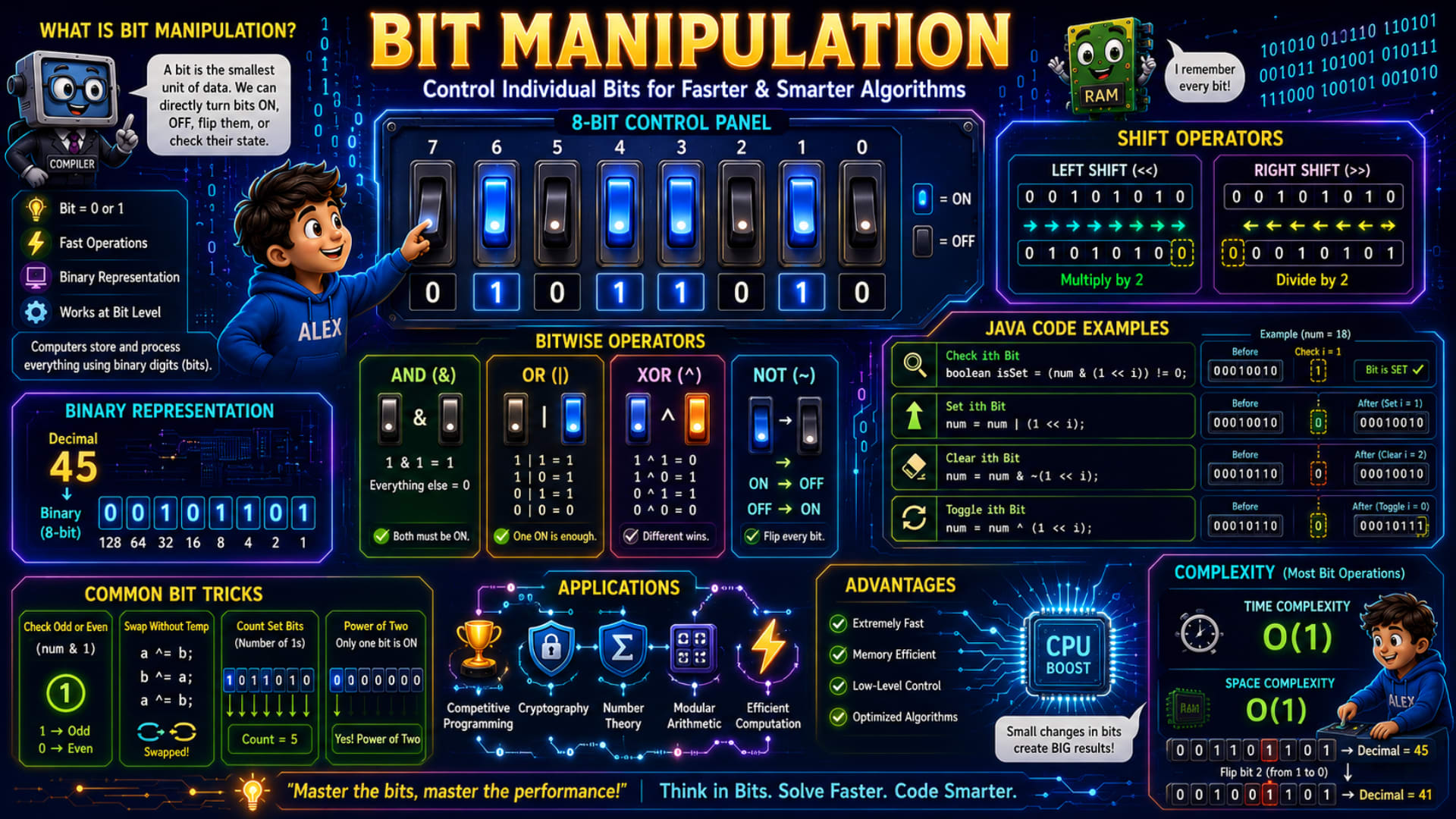
The infographic explains this beautifully using an 8-bit control panel, switches, Java examples, and real-world applications. Let's understand everything step by step.
What is Bit Manipulation?
The infographic defines Bit Manipulation as:
Control individual bits for faster and smarter algorithms.
A bit is the smallest unit of data.
It can only have two values:
0
1
Think of a light switch.
OFF = 0
ON = 1
If you have eight switches,
you have an 8-bit number.
Every switch represents one binary digit.
Instead of changing the whole number,
Bit Manipulation lets us change individual switches.
Why Do Computers Use Bits?
The infographic mentions that computers store everything using binary digits.
Electronic circuits can easily recognize only two voltage levels.
High voltage → 1
Low voltage → 0
Since computers naturally understand these two states,
every piece of information is converted into binary.
That's why learning bit manipulation is actually learning how computers think internally.
Features of Bit Manipulation
The infographic highlights four important points.
Bit = 0 or 1
Every binary digit is either ON or OFF.
There are no other possibilities.
Fast Operations
Bitwise operations are executed directly by the processor.
That's why they're extremely fast.
Binary Representation
Every number is stored internally in binary.
Even though we write:
45
The computer stores:
00101101
Works at Bit Level
Instead of changing the entire number,
we can change individual bits.
For example,
turn only the third bit ON,
or clear only the fifth bit,
without affecting the remaining bits.
Understanding Binary Representation
The infographic converts:
Decimal = 45
into binary.
Let's see how.
The place values are:
128 64 32 16 8 4 2 1
Now,
45 = 32 + 8 + 4 + 1
So we write:
128 64 32 16 8 4 2 1

 0   0  1  0 1 1 0 1
Therefore,
45 = 00101101
Every bit has its own value.
Changing just one bit changes the decimal number completely.
Understanding the 8-Bit Control Panel
The infographic shows an 8-bit switch panel.
Each switch controls one bit.
For example,
Bit 7 Bit 6 Bit 5 Bit 4 Bit 3 Bit 2 Bit 1 Bit 0
Suppose Bit 4 is OFF.
Turning it ON increases the number because that bit now contributes its place value.
This is exactly how computers represent integers internally.
Bitwise Operators
Java provides several operators for manipulating bits directly.
The infographic introduces the four basic operators.
Let's understand them one by one.
AND (&)
The rule is simple.
Both bits must be ON.
Truth table:
1 & 1 = 1

1 & 0 = 0

0 & 1 = 0

0 & 0 = 0
Easy way to remember:
Both must agree with YES.
AND is commonly used for checking whether a particular bit is ON.
OR (|)
The rule is even simpler.
If at least one bit is ON,
the result becomes ON.
Truth table:
1 | 1 = 1

1 | 0 = 1

0 | 1 = 1

0 | 0 = 0
Easy trick:
One YES is enough.
OR is commonly used for turning bits ON.
XOR (^)
XOR means:
Different wins.
Truth table:
1 ^ 1 = 0

0 ^ 0 = 0

1 ^ 0 = 1

0 ^ 1 = 1
If both inputs are the same,
the answer is 0.
If they're different,
the answer is 1.
XOR is widely used for toggling bits and swapping numbers.
NOT (~)
NOT simply flips every bit.
1 → 0

0 → 1
Every ON becomes OFF.
Every OFF becomes ON.
This operator is commonly used together with AND while clearing bits.
Shift Operators
The infographic also explains two important operators.
Left Shift (<<)
Left shift moves every bit one position toward the left.
Example:
00101010

↓

01010100
Notice,
a zero enters from the right.
For positive numbers,
every left shift approximately multiplies the value by 2.
Example:
int x = 5;

System.out.println(x << 1);
Output:
10
Because:
5 × 2 = 10
Right Shift (>>)
Right shift moves every bit one position toward the right.
Example:
00101010

↓

00010101
For positive integers,
each right shift approximately divides the number by 2.
Example:
int x = 20;

System.out.println(x >> 1);
Output:
10
Java Bit Manipulation Examples
The infographic shows four of the most common operations.
Let's understand each one.
Check ith Bit
boolean isSet = (num & (1 << i)) != 0;
What happens here?
First,
1 << i
creates a mask where only the ith bit is ON.
Then,
num & mask
checks whether that bit is already ON.
If the result isn't zero,
that bit is set.
This operation is heavily used in competitive programming.
Set ith Bit
num = num | (1 << i);
Suppose the bit is OFF.
Using OR guarantees that it becomes ON.
If it's already ON,
nothing changes.
Clear ith Bit
num = num & ~(1 << i);
This one looks scary,
but it's actually simple.
First,
1 << i
creates a mask.
Then,
~
flips every bit.
Finally,
AND clears only that bit while leaving every other bit unchanged.
Toggle ith Bit
num = num ^ (1 << i);
XOR flips the selected bit.
If it was:
1
it becomes
0
If it was:
0
it becomes
1
Common Bit Tricks
The infographic also shows some very useful tricks that every programmer should know.
Check Odd or Even
(num & 1)
Why does this work?
The last bit tells us whether a number is odd or even.
Last bit = 1
Odd
Last bit = 0
Even
Example:
int num = 7;

if ((num & 1) == 1)
    System.out.println("Odd");
else
    System.out.println("Even");
Swap Two Numbers Without Temporary Variable
The infographic shows the XOR swap trick.
a ^= b;
b ^= a;
a ^= b;
Although this works,
it's rarely used in modern Java because using a temporary variable is easier to read and modern compilers optimize it efficiently.
Still, it's a classic interview question and demonstrates the power of XOR.
Count Set Bits
Set bits simply mean:
Number of 1s.
Example:
101101
Contains:
4 set bits
Java provides an even easier built-in method:
int count = Integer.bitCount(num);
This is generally preferred in Java because it's optimized and easy to read.
Check Power of Two
A fascinating trick shown in the infographic is checking whether a number is a power of two.
(num & (num - 1)) == 0
Why does this work?
Every power of two has exactly one set bit.
Examples:
1  = 0001

2  = 0010

4  = 0100

8  = 1000

16 = 10000
Subtracting 1 flips that single set bit and all lower bits, so performing an AND operation results in zero.
This trick is widely used in system programming and competitive programming.
Where is Bit Manipulation Used?
Many beginners think bit manipulation is only useful in coding interviews.
Actually,
it has many real-world applications.
The infographic lists several.
Competitive Programming
Many problems become much faster using bit operations.
Cryptography
Encryption algorithms frequently manipulate bits to secure data.
Number Theory
Bit tricks simplify many mathematical calculations.
Modular Arithmetic
Certain modular operations can be optimized using bitwise techniques, especially when working with powers of two.
Efficient Computation
Bitwise operations help write faster and more memory-efficient code in low-level and performance-critical applications.
Advantages of Bit Manipulation
The infographic highlights several benefits.
Extremely Fast
Bitwise operations execute directly on the CPU.
Memory Efficient
Instead of storing many boolean values separately, multiple states can be packed into bits, reducing memory usage.
Low-Level Control
You gain direct control over how data is represented and manipulated internally.
Optimized Algorithms
Many algorithms become faster and cleaner when bit manipulation techniques are applied appropriately.
Time and Space Complexity
The infographic mentions an important point.
Most bit manipulation operations run in:
Time Complexity
O(1)
Whether you're checking a bit, setting it, clearing it, or toggling it, the operation takes constant time.
Space Complexity
O(1)
No extra memory proportional to the input size is required.
This constant-time performance is one reason bit manipulation is so popular in performance-sensitive code.
A Few Important Things to Know
There are a few useful concepts that aren't explicitly shown in the infographic:
Java uses two's complement to represent signed integers, which affects how negative numbers behave with bitwise operations.
Unsigned right shift (
>>>) is another Java shift operator that fills the leftmost bits with zeros, unlike>>, which preserves the sign bit.Operator precedence matters. Expressions like
num & 1 << iwork because<<has higher precedence than&, but adding parentheses (e.g.,num & (1 << i)) improves readability and avoids mistakes.Bit masks are a common technique where one integer stores multiple ON/OFF flags, making programs more memory-efficient.
Conclusion
Bit Manipulation is all about working directly with the binary representation of numbers. Instead of modifying an entire integer, you manipulate individual bits using operators like AND, OR, XOR, NOT, and Shift. These operations are incredibly fast because they are supported directly by the processor. Once you become comfortable thinking in binary, many advanced programming problems become simpler and more efficient to solve. Whether you're building optimized algorithms, solving competitive programming questions, or understanding how computers work internally, bit manipulation is an essential skill to have.
Quick Revision
Concept | Remember |
|---|---|
Bit | Smallest unit of data (0 or 1). |
Binary Representation | Every number is stored as a sequence of bits. |
AND ( | 1 only when both bits are 1. |
OR ( | 1 if at least one bit is 1. |
XOR ( | 1 when bits are different; useful for toggling. |
NOT ( | Flips every bit. |
Left Shift ( | Moves bits left; approximately multiplies by 2. |
Right Shift ( | Moves bits right; approximately divides by 2 (for positive numbers). |
Common Tricks | Check odd/even, set, clear, toggle bits, count set bits, power of two. |
Complexity | Most bit operations run in O(1) time and O(1) space. |