A data type tells Java what kind of data a variable can store.
For example:
int age = 25;Here:
int→ data typeage→ variable25→ value
Java needs to know the data type because different types of data require different amounts of memory and support different operations.
For example:
int age = 25;
double price = 99.99;
char grade = 'A';
boolean isStudent = true;
Here we are storing four different kinds of data.
1. Types of Data in Java
Java data types are broadly divided into two categories:
                    Data Types
                        │
             ┌──────────┴──────────┐
             │                     │
        Primitive             Non-Primitive
             │                     │
       ┌─────┴─────┐        ┌──────┼──────┐
       │           │        │      │      │
     Numeric    Character  String  Array  Class
       │
   ┌───┴────┐
   │        │
Integer   Decimal
There are 8 primitive data types in Java.
Non-primitive types include things like String, arrays, classes, objects, interfaces, and enums.
2. Primitive Data Types
Primitive data types are the basic data types built into Java.
Java has exactly 8 primitive types:
Type | Example | Purpose |
|---|---|---|
|
| Small integers |
|
| Small integers |
|
| Integer numbers |
|
| Large integers |
|
| Decimal numbers |
|
| Decimal numbers |
|
| Single character |
|
| True/false |
Let's understand them one by one.
byte
byte is used for small whole numbers.
byte age = 25;Range:
-128 to 127It takes 1 byte of memory.
short
short is used for whole numbers larger than byte.
short temperature = 300;Range:
-32,768 to 32,767It takes 2 bytes.
int
int is the most commonly used integer type.
int salary = 50000;
int age = 25;
Range:
-2,147,483,648 to 2,147,483,647It takes 4 bytes.
For most normal integer values, use int.
long
long is used when the number is too large for an int.
long population = 8000000000L;Notice the L at the end.
It takes 8 bytes.
Decimal Data Types
Java has two primitive types for decimal numbers:
float
double
float
float price = 99.99f;You generally need f at the end because Java treats decimal literals as double by default.
float price = 99.99f;double
double pi = 3.1415926535;double provides more precision than float.
For most decimal calculations, double is preferred.
char
char stores a single character.
char grade = 'A';
char symbol = '#';
Notice that we use single quotes:
'A'Not:
"A""A" is a String, while 'A' is a char.
boolean
boolean stores only two possible values:
true
false
Example:
boolean isLoggedIn = true;
boolean isJavaEasy = false;
It is commonly used with conditions:
if (isLoggedIn) {
    System.out.println("Welcome!");
}
3. Non-Primitive Data Types
Now let's look at non-primitive data types, also called reference types.
Examples include:
String
Array
Class
Object
Interface
Enum
Unlike primitive types, these types are associated with objects or references to objects.
For example:
String name = "John";Here:
String → data type
name   → variable
"John"  → value
Another example:
int[] numbers = {10, 20, 30};int[] is a non-primitive type because an array is an object.
Primitive vs Non-Primitive
The basic difference is:
Primitive
    ↓
Stores a value

Non-Primitive
    ↓
Stores a reference to an object
For example:
int age = 26;Conceptually:
age
 ↓
26
But:
String name = "John";Conceptually:
name
 ↓
reference
 ↓
"John" object
4. Stack and Heap Memory
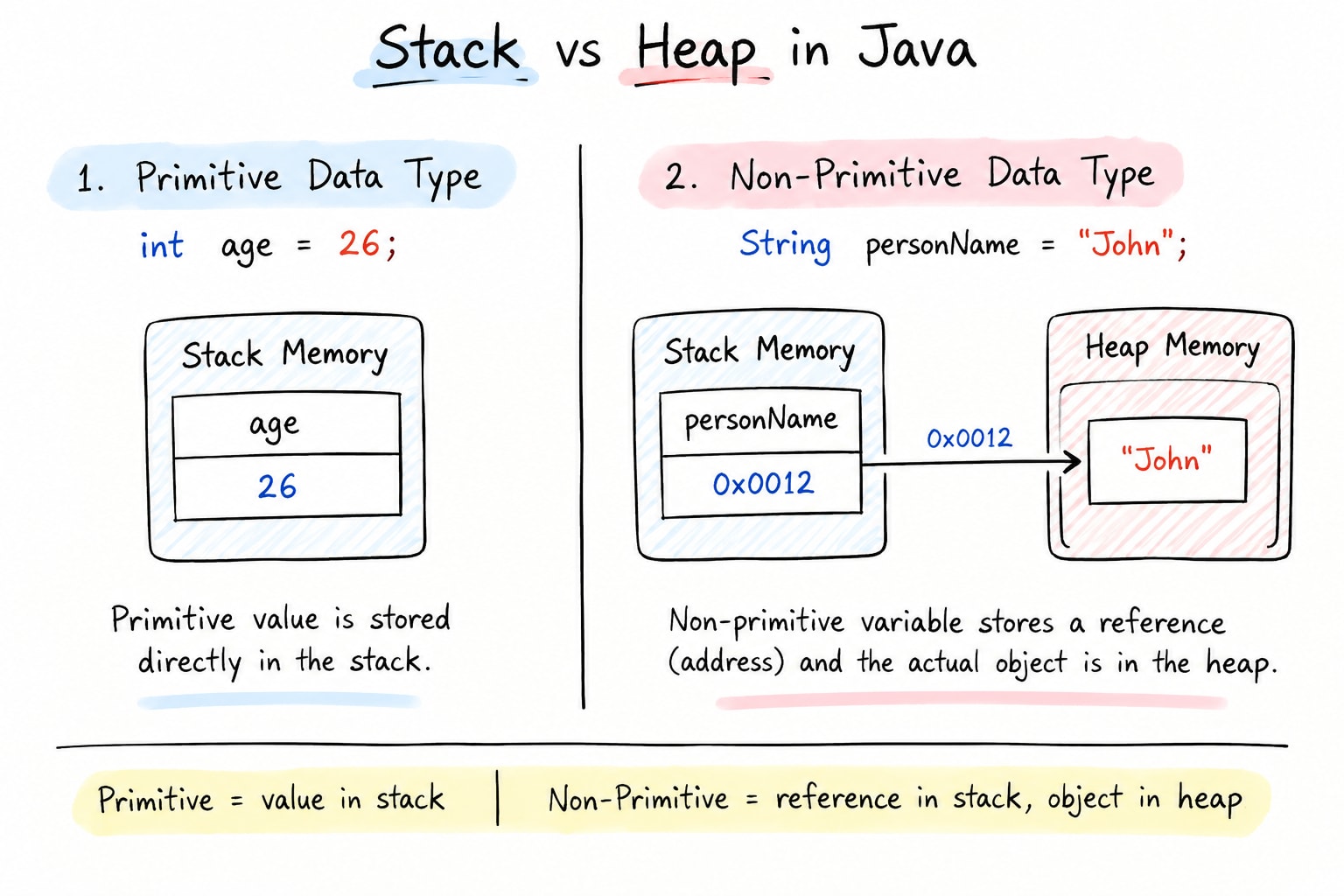
Now we can connect this to Stack and Heap memory.
When a Java program runs, the JVM uses different areas of memory.
Two important areas are:
Stack Memory
Heap Memory
A useful beginner mental model is:
Stack → method frames, local variables and references
Heap → objects and arrays
Primitive Example
Consider:
int age = 26;Conceptually:
        STACK MEMORY

       ┌─────────────┐
       │     age     │
       ├─────────────┤
       │     26      │
       └─────────────┘

        HEAP MEMORY

       ┌─────────────┐
       │             │
       │   Nothing   │
       │   needed    │
       │   here for  │
       │  this local │
       │   primitive │
       └─────────────┘
The important idea is:
The primitive variable contains the actual value.
age → 26Non-Primitive Example
Now consider:
String personName = "John";Conceptually:
             STACK                         HEAP

       ┌───────────────┐             ┌───────────────┐
       │ personName    │             │ String Object │
       ├───────────────┤             ├───────────────┤
       │    0x0012     │────────────►│    "John"     │
       └───────────────┘             └───────────────┘
             │
             │
        Reference
The variable personName contains a reference.
That reference points to the String object/data in the heap.
5. What About Arrays?
Arrays are also non-primitive/reference types.
Example:
int[] numbers = {10, 20, 30};Conceptually:
             STACK                         HEAP

       ┌───────────────┐             ┌────────────────┐
       │    numbers    │             │ Array Object   │
       ├───────────────┤             ├────────────────┤
       │    0x0020     │────────────►│ 10 │ 20 │ 30   │
       └───────────────┘             └────────────────┘
             │
          Reference
The numbers variable contains a reference, while the array object is in the heap.
6. What About Objects?
Suppose we create a class:
class Student {
    String name;
    int age;
}
Then:
Student student = new Student();Conceptually:
             STACK                         HEAP

       ┌───────────────┐             ┌─────────────────┐
       │    student    │             │ Student Object  │
       ├───────────────┤             ├─────────────────┤
       │    0x0030     │────────────►│ name            │
       └───────────────┘             │ age             │
             │                       └─────────────────┘
          Reference
Again:
student
   ↓
reference
   ↓
Student object
7. The Big Picture
Now put everything together:
                         JAVA DATA TYPES
                               │
                 ┌─────────────┴─────────────┐
                 │                           │
            PRIMITIVE                 NON-PRIMITIVE
                 │                           │
        Stores actual value          Stores a reference
                 │                           │
                 ▼                           ▼
              STACK                    STACK → HEAP
                                           │
                                           ▼
                                        OBJECT
For example:
int age = 26;

String name = "John";
Memory concept:
             STACK                         HEAP

       ┌──────────────┐             ┌────────────────┐
       │ age          │             │ String Object  │
       │    26        │             │                │
       ├──────────────┤             │    "John"      │
       │ name         │────────────►│                │
       │   0x0012     │             └────────────────┘
       └──────────────┘
So the simple rule to remember is:
Primitive
Variable → Actual ValueNon-Primitive
Variable → Reference → Object
                         ↓
                       Heap