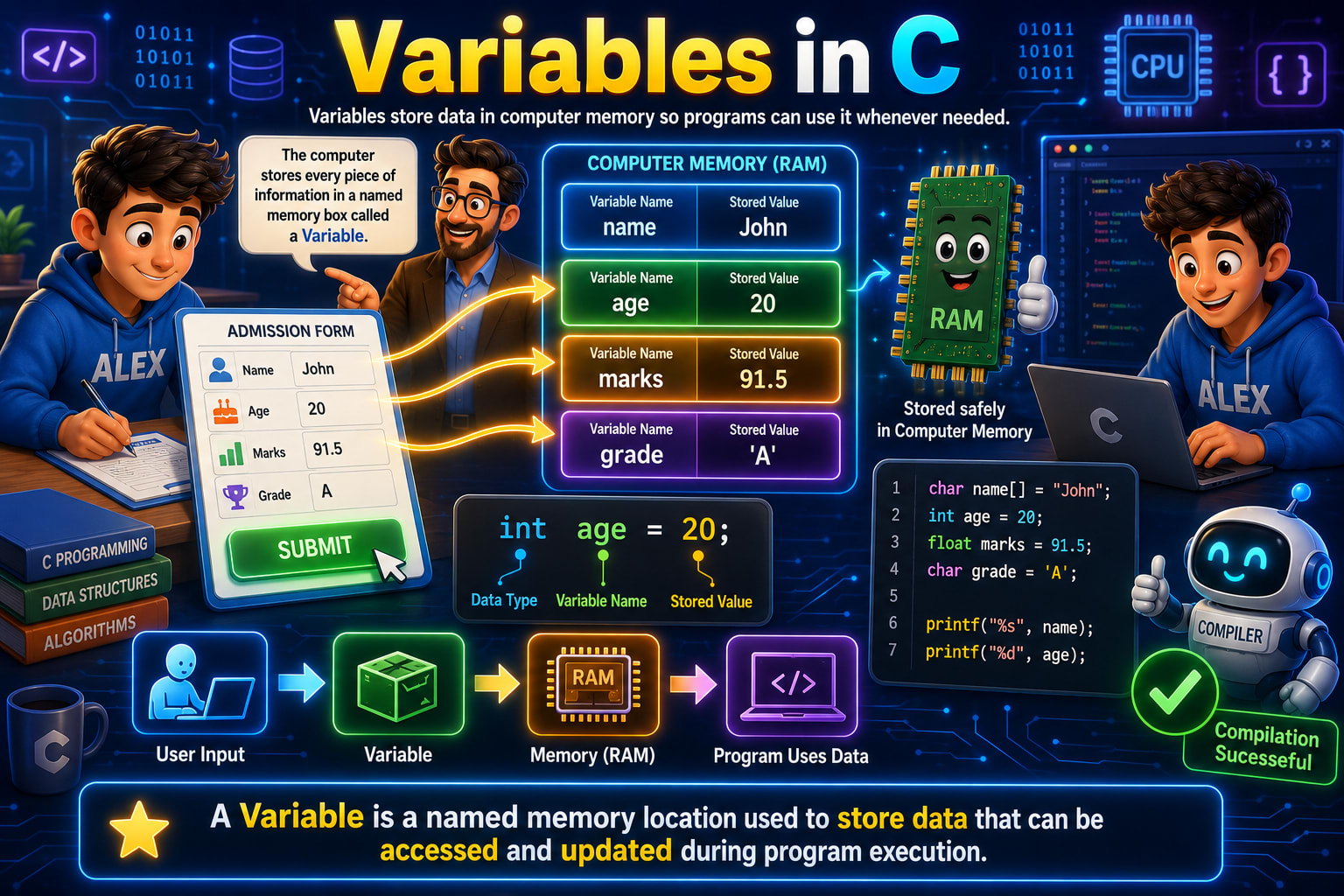
If you've just started learning C programming, you've probably heard the word Variable many times. Almost every C program uses variables because they're one of the most fundamental building blocks of programming.
But here's the good news—you don't need to memorize any definitions.
Instead, let's understand variables using the same example shown in the infographic above. By the end of this lesson, you'll know exactly what a variable is, why we need it, how it's stored inside the computer's memory, and how C programs use it.
What Exactly is a Variable?
Look at the definition at the bottom of the infographic.
A Variable is a named memory location used to store data that can be accessed and updated during program execution.
Now this definition sounds technical.
Let's simplify it.
Imagine you're filling out an admission form, just like Alex is doing in the image.
The form asks for
Name
Age
Marks
Grade
You write
Name  : John
Age   : 20
Marks : 91.5
Grade : A
Now imagine the computer wants to remember all this information.
Where will it store it?
Inside RAM (Random Access Memory).
But how will the computer know which value belongs to which information?
That's where variables come in.
Instead of simply storing
John
20
91.5
A
the computer stores
name  → John
age   → 20
marks → 91.5
grade → A
Each label is called a Variable Name.
Each value is called the Stored Value.
That's exactly what the RAM illustration in the infographic is showing.
Why Do We Need Variables?
Suppose your college has 10,000 students.
Would it be possible to remember everyone's information without names?
Of course not.
Instead, every student has
Name
Roll Number
Registration Number
Similarly, in programming, every piece of information gets its own name.
Instead of saying
Store 20 somewhere...
we say
Store 20 inside age
Now whenever we need the age, we simply use
age
instead of writing
20
This makes programs organized and easy to understand.
Understanding the Admission Form Example
Let's look carefully at the admission form shown in the infographic.
Alex enters four pieces of information.
Name  : John
Age   : 20
Marks : 91.5
Grade : A
Now something interesting happens.
The glowing arrows show this information moving into the computer's memory.
Inside RAM we see
Variable Name      Stored Value

name               John

age                20

marks              91.5

grade              A
This is exactly how variables work.
The values entered by the user get stored in memory using meaningful names.
What is RAM?
The infographic highlights a RAM chip.
RAM stands for Random Access Memory. It is the computer's temporary working memory.
Whenever a program runs,
variables
functions
arrays
objects
calculations
are all stored in RAM.
Think of RAM as your study table.
When you're studying, you place
books
pens
notebook
calculator
on the table.
Once you're done studying, everything is removed.
Similarly, when a program ends, RAM is cleared. That's why variables usually disappear after the program finishes.
Variable = A Labeled Box
The speech bubble in the infographic says
The computer stores every piece of information in a named memory box called a Variable.
This is probably the easiest way to understand variables.
Imagine four boxes.
+-------------+
| name        |
|-------------|
| John        |
+-------------+

+-------------+
| age         |
|-------------|
| 20          |
+-------------+

+-------------+
| marks       |
|-------------|
| 91.5        |
+-------------+

+-------------+
| grade       |
|-------------|
| A           |
+-------------+
Each box has
a name
some data
The name is the variable.
The value is what the variable stores.
Declaring Variables in C
Now look at the code in the infographic.
char name[] = "John";
int age = 20;
float marks = 91.5;
char grade = 'A';
Let's understand every single line.
First Variable
char name[] = "John";
This stores the student's name.
Let's break it apart.
char
This is the data type.
It tells C "I want to store characters."
Since "John" contains multiple characters, an array of characters is used.
J
o
h
n
\0
The compiler stores every letter separately.
name
This is the variable name.
It is simply the label.
Whenever we need John's name, we use
name
instead of writing
John
every time.
=
This is the assignment operator.
It means "Store this value."
"John"
This is the actual data being stored.
So this entire statement means
Create a variable called name and store John inside it.
Second Variable
int age = 20;
Again let's understand every part.
int
The data type.
It stores whole numbers.
Examples
5
10
20
100
500
Integers cannot store decimal values.
age
Variable name.
20
Stored value.
So the computer creates a memory location called
age
and stores
20
inside it.
Third Variable
float marks = 91.5;
Marks contain decimal values.
So we use
float
instead of
int
The value stored is
91.5
If we had written
int marks = 91.5;
the decimal part would be lost.
The value would become
91
That's why choosing the correct data type is important.
Fourth Variable
char grade = 'A';
Here we store
A
Notice something important.
'A'
uses single quotes.
But
"John"
uses double quotes.
Why?
Because
'A'
is a single character.
While
"John"
is a string (multiple characters).
This is one of the most common mistakes beginners make.
Understanding the Variable Structure
The infographic shows
int age = 20;
and divides it into three parts.
Data Type
int
Tells C what kind of data will be stored.
Variable Name
age
The identifier used to access the value later.
Stored Value
20
The actual information stored inside memory.
Every variable declaration follows this basic pattern.
DataType VariableName = Value;
For example
float salary = 25000.50;
char grade = 'A';
int roll = 12;
All follow the same structure.
What Happens Inside the Computer?
Let's follow the arrows shown in the infographic.
Step 1
The user enters information.
John
20
91.5
A
Step 2
The program creates variables.
name
age
marks
grade
Step 3
RAM allocates memory.
Separate memory locations are reserved.
Step 4
Values are stored.
name → John

age → 20

marks → 91.5

grade → A
Step 5
Whenever the program needs the data,
it simply asks
name

age

marks

grade
instead of asking the user again.
This makes programs efficient.
Accessing Variables
The infographic also shows
printf("%s", name);

printf("%d", age);
Let's understand this.
Suppose we want to display the student's information.
We don't write
printf("John");
Instead we write
printf("%s", name);
Why?
Because tomorrow the value might change.
Maybe
John
becomes
David
The variable remains
name
Only the stored value changes.
That's the biggest advantage of variables.
Can Variables Change?
Yes.
That's why they're called Variables.
Their values can vary.
Initially
age = 20;
Later
age = 21;
Later
age = 22;
The variable name stays the same.
Only the stored value changes.
Real-Life Examples of Variables
Think about your phone.
Your contacts are stored like
Name → Rahul

Phone → 9876543210
Bank account
Balance → 5000
Game
Health → 100

Score → 500
Shopping app
CartItems → 5
Followers → 10000
Every application you use stores information inside variables.
Common Beginner Mistakes
Using the wrong data type
Wrong
int marks = 91.5;
Correct
float marks = 91.5;
Using double quotes for characters
Wrong
char grade = "A";
Correct
char grade = 'A';
Using single quotes for strings
Wrong
char name[] = 'John';
Correct
char name[] = "John";
Forgetting the semicolon
Wrong
int age = 20
Correct
int age = 20;
Interview Questions
1. What is a variable in C?
A variable is a named memory location used to store data that can be accessed and modified during program execution.
2. Why do variables need data types?
The data type tells the compiler what kind of data will be stored and how much memory should be allocated.
3. Can the value of a variable change?
Yes. Variables are designed to hold values that may change while the program runs.
4. Where are variables stored?
Most local variables are stored in RAM while the program is executing.
5. What is the difference between a variable name and its value?
The variable name is the label used to access the data, while the value is the actual information stored in memory.
Quick Recap
Let's summarize everything we learned from the infographic.
A variable is a named memory location used to store data.
Variables help programs remember information like names, ages, marks, and grades.
In the admission form example, the values John, 20, 91.5, and A are stored in variables named
name,age,marks, andgrade.These values are stored temporarily in RAM while the program is running.
Every variable declaration in C has three main parts: Data Type, Variable Name, and Stored Value.
Different data types are used for different kinds of data, such as
intfor whole numbers,floatfor decimal values, andcharfor characters.Variables make programs flexible because their stored values can be updated and reused whenever needed.
Now that you understand variables, you're ready to move on to the next important concept in C programming: Data Types, where you'll learn in greater detail why C provides different types like int, float, char, and many others, and how choosing the correct data type affects memory usage and program behavior.