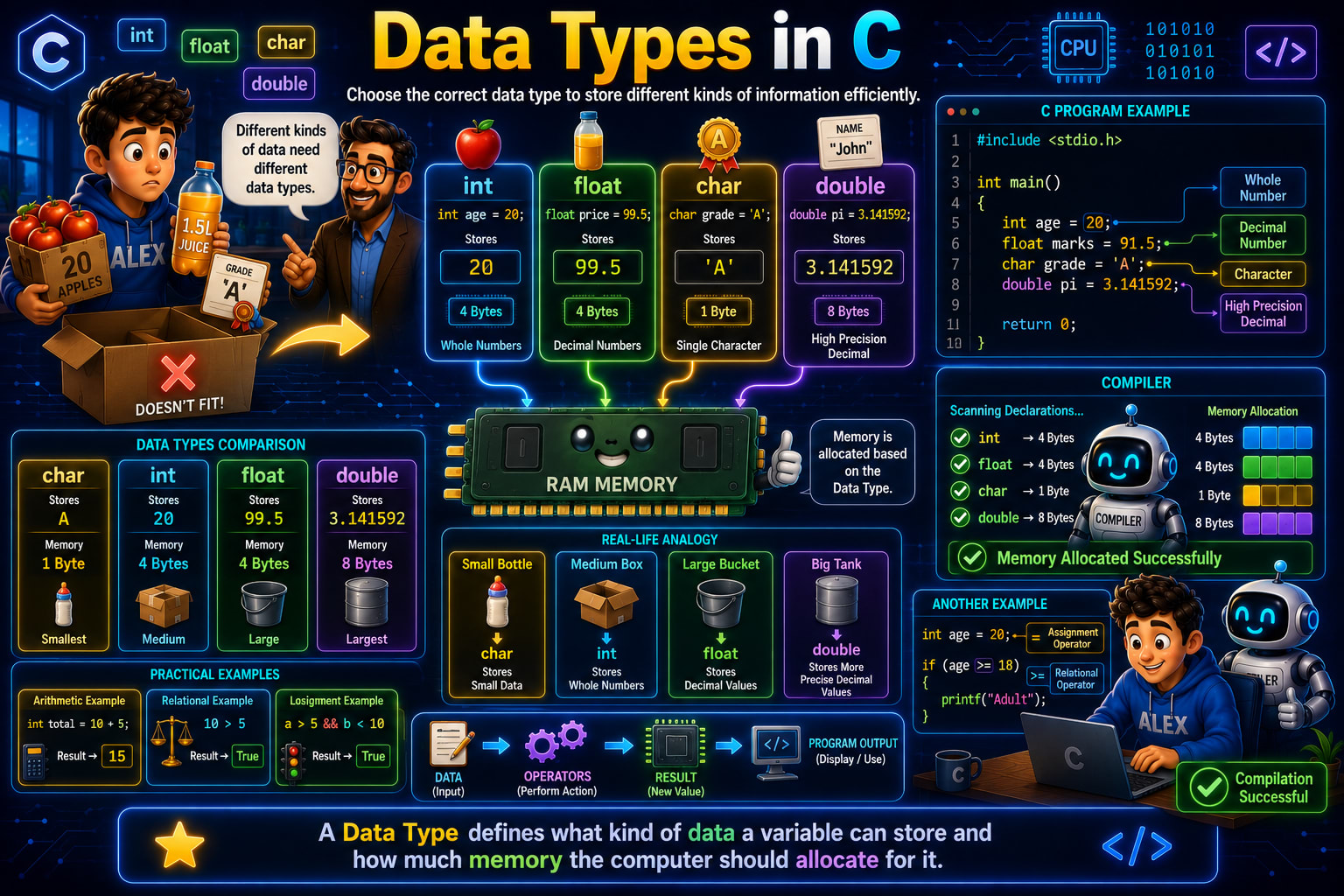
Imagine you're helping Alex pack different items into boxes.
He has 20 apples, a bottle containing 99.5 liters of juice, a grade 'A', and the mathematical value 3.141592.
Would you put all of them in the same type of container?
Of course not.
A small item needs a small container, while a large item needs a bigger one.
Computers work in exactly the same way.
Different kinds of data require different amounts of memory. If the computer stored every value using the same amount of memory, it would waste a lot of space.
That's why C provides Data Types.
If you look at the infographic, you'll notice the teacher explaining that different kinds of data need different data types. This is one of the most important concepts in programming because every variable you create must have a data type.
What is a Data Type?
Let's start with the definition shown at the bottom of the infographic.
A Data Type defines what kind of data a variable can store and how much memory the computer should allocate for it.
This definition tells us two important things.
A data type decides:
What kind of value can be stored.
How much memory should be reserved in RAM.
Whenever you create a variable, the compiler first checks its data type before allocating memory.
For example,
int age = 20;
The compiler immediately understands that age stores a whole number, so it reserves 4 bytes of memory.
Similarly,
char grade = 'A';
Since only one character needs to be stored, the compiler reserves just 1 byte.
This is why choosing the correct data type is so important.
Why Do We Need Different Data Types?
Look at the example shown on the left side of the infographic.
Alex has different items.
Apples
Juice
Grade Card
Every item is different.
The number of apples is a whole number.
The amount of juice contains a decimal.
The grade is just a single character.
These values are completely different from each other.
Programming works exactly the same way.
Suppose you're creating a student management system.
You need to store
Age
Marks
Grade
Student Name
Each value has a different format.
20
is a whole number.
91.5
contains a decimal.
'A'
is a single character.
John
contains multiple characters.
Since every value is different, C provides different data types for storing them efficiently.
Understanding the Four Basic Data Types
The infographic introduces four commonly used data types.
int
float
char
double
Let's understand each one.
int – Integer Data Type
The first data type shown is
int
The int data type is used to store whole numbers.
Example from the infographic:
int age = 20;
Here,
age
is the variable name.
20
is the value.
Since 20 has no decimal point, int is the correct choice.
The infographic also shows that an integer typically occupies
4 Bytes
of memory.
Some more examples are
int marks = 95;
int students = 120;
int salary = 50000;
All these values are whole numbers.
What Happens If We Store a Decimal in an int?
Suppose you write
int price = 99.5;
At first, this might seem okay.
But int cannot store decimal values.
The decimal part gets discarded.
The value becomes
99
instead of
99.5
This is one of the most common mistakes beginners make.
Whenever your value contains a decimal point, use float or double instead of int.
float – Floating Point Data Type
The second data type is
float
The float data type stores decimal numbers.
The infographic uses this example.
float price = 99.5;
Notice that
99.5
contains a decimal point.
That's why we use float.
Just like int, a float generally occupies
4 Bytes
of memory.
Some more examples are
float temperature = 36.8;

float weight = 62.5;

float percentage = 89.75;
Whenever a number has a fractional part, float is usually the right choice.
char – Character Data Type
The next data type shown is
char
A char stores only one character.
The infographic shows
char grade = 'A';
Notice something important.
The value uses
'A'
instead of
"A"
Why?
Because
'A'
represents one character.
While
"A"
is treated as a string.
A character variable generally occupies
1 Byte
of memory.
Some more examples are
char gender = 'M';

char answer = 'Y';

char symbol = '#';
Each variable stores exactly one character.
Can char Store a Word?
Suppose you write
char name = 'John';
This won't work.
Why?
Because char can hold only one character.
If you want to store a complete word, you use a character array.
For example,
char name[] = "John";
You'll learn strings and character arrays in detail later, but it's important to remember that char stores only one character at a time.
double – Double Precision Data Type
The fourth data type shown is
double
The infographic uses
double pi = 3.141592;
You may wonder why we don't simply use float.
The answer is precision.
A double stores decimal numbers with much higher accuracy.
It generally occupies
8 Bytes
of memory.
Some examples are
double distance = 12567.987654;

double salary = 45678.987654;

double pi = 3.1415926535;
Whenever high precision is required, double is preferred over float.
Comparing All Four Data Types
The comparison chart in the infographic gives a quick overview.
Data Type | Stores | Memory |
|---|---|---|
char | Single Character | 1 Byte |
int | Whole Numbers | 4 Bytes |
float | Decimal Numbers | 4 Bytes |
double | High Precision Decimal Numbers | 8 Bytes |
Notice something interesting.
As the amount of information increases, the memory requirement also increases.
That's why choosing the right data type helps programs use memory efficiently.
Understanding the RAM Section
The center of the infographic shows RAM with arrows pointing from each data type.
This illustrates something very important.
When you declare a variable,
int age = 20;
the compiler first checks the data type.
After that, it reserves memory inside RAM.
For example,
int
↓
Reserve 4 Bytes
float
↓
Reserve 4 Bytes
char
↓
Reserve 1 Byte
double
↓
Reserve 8 Bytes
This memory allocation happens automatically.
As programmers, we don't manually reserve memory for these basic variables. The compiler handles it for us based on the data type we choose.
The Compiler's Role
The compiler section on the right side of the infographic shows exactly what happens during compilation.
When the compiler scans your program,
int age = 20;

float marks = 91.5;

char grade = 'A';

double pi = 3.141592;
it allocates memory like this.
int      → 4 Bytes

float    → 4 Bytes

char     → 1 Byte

double   → 8 Bytes
Once all declarations are correct, the compiler displays
Memory Allocated Successfully
This entire process happens before your program starts executing.
Understanding the Program Example
Let's examine the program shown in the infographic.
#include <stdio.h>

int main()
{
    int age = 20;
    float marks = 91.5;
    char grade = 'A';
    double pi = 3.141592;

    return 0;
}
Every variable here uses a different data type.
age
stores a whole number.
marks
stores a decimal number.
grade
stores one character.
pi
stores a high-precision decimal number.
This example demonstrates why different data types exist. Each variable uses the data type that best matches the kind of data it needs to store.
Real-Life Analogy
The infographic uses containers of different sizes to explain data types.
Think of it like this.
A small bottle is enough to hold a small amount of liquid.
A medium box is suitable for larger items.
A large bucket can hold even more.
A big tank is designed for the largest capacity.
Similarly,
charstores a very small amount of data.intstores whole numbers.floatstores decimal values.doublestores decimal values with higher precision.
Choosing the right container avoids wasting space, just like choosing the right data type avoids wasting memory.
Practical Examples
The infographic also includes a few practical examples.
int total = 10 + 5;
The result is
15
because integer arithmetic is performed.
Another example compares values.
10 > 5
This expression evaluates to
True
The logical example
a > 5 && b < 10
also produces either True or False depending on the values of a and b.
These examples show that once data is stored using the correct data type, operators can perform calculations and comparisons on it.
Common Beginner Mistakes
A common mistake is storing decimal numbers in an integer variable.
int marks = 91.5;
The decimal part is lost.
The correct declaration is
float marks = 91.5;
Another mistake is storing a word inside a character variable.
char name = 'John';
A char stores only one character.
The correct declaration is
char name[] = "John";
Beginners also use double everywhere without considering memory usage. While double provides higher precision, using it unnecessarily can increase memory consumption, especially when working with large amounts of data.
Finally, many beginners confuse characters with strings. Remember that characters use single quotes ('A'), while strings use double quotes ("John").
Interview Questions
1. What is a data type in C?
A data type specifies what kind of data a variable can store and how much memory should be allocated for it.
2. Which data type stores whole numbers?
int
3. Which data type stores decimal numbers?
float and double
4. What is the difference between float and double?
Both store decimal numbers, but double provides higher precision and generally uses more memory.
5. How much memory does a char usually occupy?
1 Byte.
Quick Recap
Let's summarize what you've learned.
A data type tells the compiler what kind of value a variable can store and how much memory it should allocate.
C provides different data types because different kinds of information require different amounts of memory.
intstores whole numbers,floatstores decimal values,charstores a single character, anddoublestores high-precision decimal values.When you declare a variable, the compiler automatically allocates memory in RAM based on its data type.
Choosing the correct data type improves memory efficiency and helps prevent programming errors.
Understanding data types is essential because every variable you create in C must be associated with an appropriate data type before it can store any value.
Once you're comfortable with data types, the next step is learning Type Conversion and Type Casting, where you'll see how C converts values from one data type to another during calculations and assignments.