When beginners start learning C programming, they usually jump straight into writing code like this:
int age = 20;
At first glance, it looks like just one simple statement. You might think the compiler reads the entire line at once and immediately understands what to do.
But that's not how it works.
Before the compiler can understand your program, it first breaks every line of code into small meaningful pieces. These small pieces are called Tokens.
Think of it this way. Imagine you're building a LEGO house. You don't create the entire house in one step. Instead, you join hundreds of individual LEGO bricks together. Each brick has its own purpose, and only when all the bricks are arranged correctly does the final house take shape.
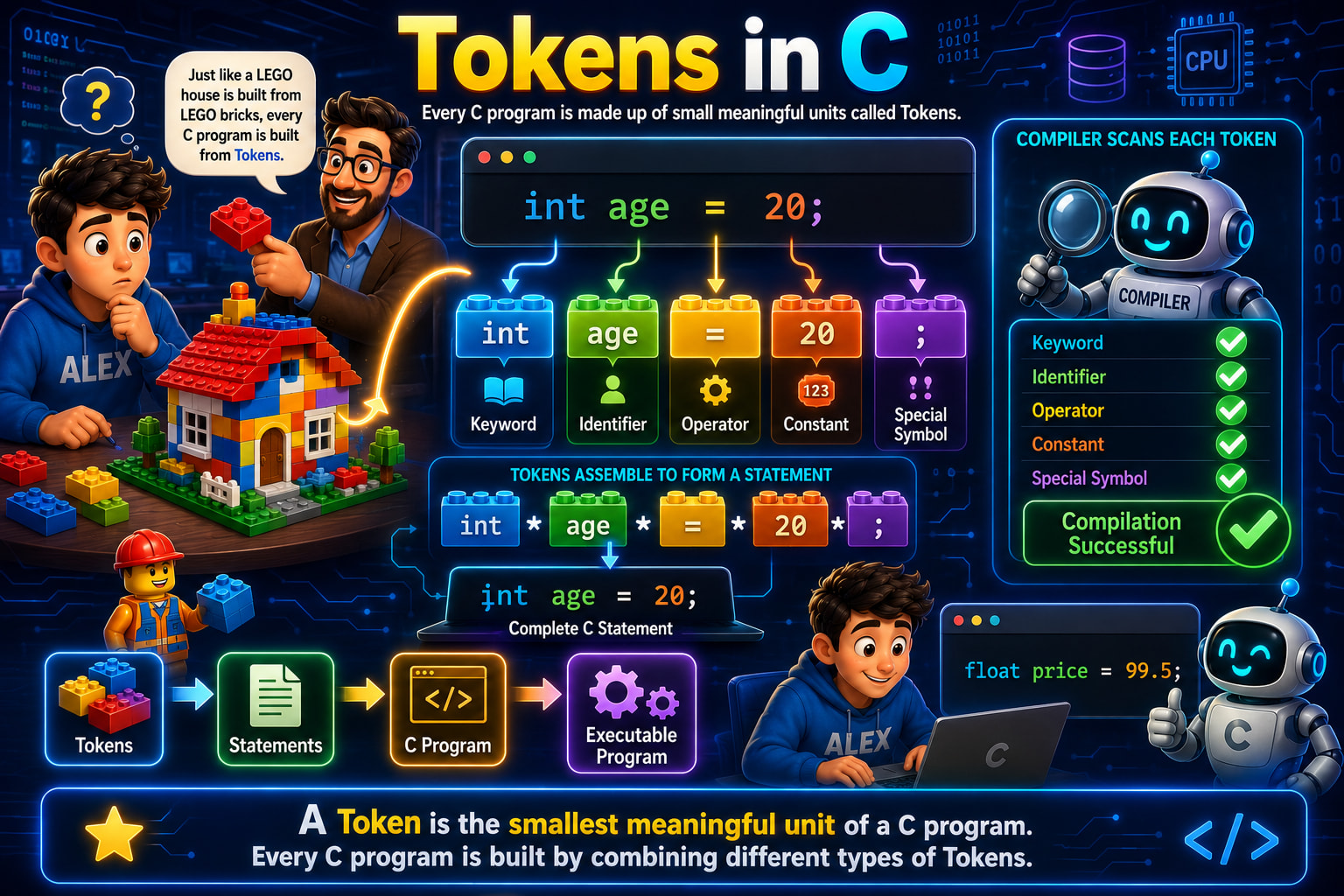
That's exactly the analogy shown on the left side of the infographic. The teacher is holding a LEGO brick and explaining to Alex that just like a LEGO house is built from LEGO bricks, every C program is built from Tokens.
So before learning loops, functions, arrays, or pointers, you first need to understand the tiny building blocks that make up every C program.
What is a Token?
Let's start with the definition shown at the bottom of the infographic.
A Token is the smallest meaningful unit of a C program. Every C program is built by combining different types of Tokens.
The keyword here is meaningful.
Consider the following statement:
int age = 20;To us, this looks like one line of code.
But to the compiler, it is actually five separate meaningful pieces.
int
age
=
20
;
Each of these is an individual token.
The compiler never reads this line as one big sentence. Instead, it scans each token one by one, identifies what it represents, and then understands the complete statement.
Why Do We Need Tokens?
Imagine someone gives you a book without any spaces between words.
Thisisaverylongsentencewithoutspaces.
Reading it would be extremely difficult.
Instead, we naturally divide it into meaningful words.
This
is
a
very
long
sentence
without
spaces.
Programming languages work in a similar way.
The compiler doesn't simply look at an entire line of code. It separates the line into meaningful units first. Once it knows what each unit represents, it can understand the complete statement.
Those meaningful units are called Tokens.
Understanding the LEGO Example
The infographic uses one of the best real-life examples for understanding tokens.
Imagine you want to build this LEGO house.
You don't manufacture an entire house.
Instead, you start with small LEGO pieces.
Each brick has its own size, shape, and color.
When those bricks are combined correctly, they form walls, windows, doors, and finally the complete house.
Programming works exactly the same way.
A C program isn't written as one giant block.
Instead, it's created by combining many small tokens.
Tokens
      ↓
Statements
      ↓
C Program
      ↓
Executable Program
That's the complete flow shown at the bottom of the infographic.
Breaking Down Our First Statement
Now let's focus on the statement displayed in the center of the infographic.
int age = 20;
Although it looks like a single line, it actually consists of five different tokens.
int
age
=
20
;
Each token belongs to a different category.
Let's understand every one of them.
Token 1 – Keyword
The first token is
int
This is called a Keyword.
A keyword is a word that already has a predefined meaning in the C language.
When the compiler sees
int
it immediately understands
"The programmer wants to create an integer variable."
Since keywords already have predefined meanings, we cannot use them as variable names.
For example,
int int = 10;
This is invalid.
Why?
Because the compiler already knows that int means integer data type.
It cannot simultaneously be used as the name of a variable.
Some common keywords are
int
float
char
if
else
for
while
return
break
continue
switch
Every one of these has a special meaning inside C.
Token 2 – Identifier
The second token is
age
This is an Identifier.
An identifier is simply a name given by the programmer.
Here,
age
is the name of the variable.
Tomorrow you could write
int marks;
or
int salary;
or
int score;
These are all identifiers because they are names created by the programmer.
Unlike keywords, identifiers don't have predefined meanings.
They simply help us identify variables, functions, arrays, and many other programming elements.
Rules for Naming Identifiers
Although programmers can choose almost any meaningful name, C follows a few rules.
A variable name
✅ Can contain letters
age
✅ Can contain digits
student1
✅ Can contain underscores
total_marks
But it cannot
❌ Start with a digit
1age
❌ Contain spaces
student age
❌ Use special symbols
marks@
❌ Be a keyword
int int;
Choosing meaningful identifiers makes programs much easier to read.
Token 3 – Operator
The next token is
=
This is an Operator.
Operators perform operations.
In this example,
=
is called the Assignment Operator.
Its job is very simple.
It copies the value on the right side into the variable on the left side.
So,
age = 20;
means
Store the value 20 inside the variable age.
Notice something interesting.
Many beginners confuse
=
with
==
They are completely different.
=
Assignment

==
Comparison
You'll learn comparison operators later when we study decision-making statements.
Token 4 – Constant
The fourth token is
20
This is called a Constant.
A constant is simply a fixed value.
Unlike variables, constants do not change.
In our statement,
20
is an integer constant.
Similarly,
99.5
shown on the right side of the infographic is a floating-point constant.
Some examples are
10

500

3.14

'A'

"John"
These are all constants because they represent fixed values.
Token 5 – Special Symbol
The final token is
;
This tiny symbol may look unimportant, but it plays a huge role.
The semicolon tells the compiler
"This statement ends here."
Imagine reading a paragraph without full stops.
It would be confusing.
Similarly, without semicolons, the compiler wouldn't know where one statement ends and another begins.
That's why forgetting a semicolon is one of the most common beginner mistakes.
How the Compiler Reads Your Program
Look at the robot on the right side of the infographic.
The heading says
Compiler Scans Each Token
This is exactly what happens.
Suppose your program contains
int age = 20;
The compiler scans
Token 1 → int

Token 2 → age

Token 3 → =

Token 4 → 20

Token 5 → ;
After recognizing every token, it checks whether the statement follows the rules of C.
If everything is correct,
the compiler successfully moves to the next step.
If something is wrong,
it reports an error.
What Happens If One Token Is Wrong?
Suppose you accidentally write
innt age = 20;
Now the compiler scans
innt
Immediately it gets confused.
Why?
Because innt is not a valid keyword.
Compilation fails.
Similarly,
int age = ;
Here,
the constant is missing.
Again,
the compiler reports an error.
This shows why every token matters.
Even a single incorrect token can prevent your program from compiling.
Tokens Assemble to Form Statements
Look at the middle section of the infographic.
The individual LEGO blocks
int

age

=

20

;
come together to form
int age = 20;
This complete line is called a Statement.
A statement is simply a meaningful instruction written using tokens.
Programs aren't made directly from tokens.
Instead,
Tokens
combine to form
Statements
and many statements together create a complete C program.
From Tokens to an Executable Program
The flow diagram at the bottom beautifully summarizes the entire process.
Tokens
      ↓
Statements
      ↓
C Program
      ↓
Executable Program
This is exactly how software is built.
Small tokens become statements.
Statements become programs.
Programs are compiled into executable files that the computer can actually run.
Without tokens, none of this would be possible.
Another Example
The infographic also shows
float price = 99.5;
Let's identify its tokens.
float      → Keyword

price      → Identifier

=          → Operator

99.5       → Constant

;          → Special Symbol
Although the values have changed, the pattern remains exactly the same.
Almost every variable declaration in C follows this structure.
Whitespace and Tokens
You may wonder whether spaces are tokens.
Consider these two statements.
int age=20;
and
int age = 20;
Both work perfectly.
Why?
Because spaces are not tokens. They simply separate tokens so the compiler can recognize them easily. Whether you write one space or multiple spaces, the compiler still identifies the same five tokens.
Comments Are Ignored During Tokenization
Suppose you write
// Student Age
int age = 20;
The comment helps humans understand the code, but the compiler ignores it while processing the program. It only scans the actual code tokens needed for compilation.
Common Beginner Mistakes
One of the most common mistakes is assuming an entire line is a single token.
Remember,
int age = 20;
contains five different tokens.
Another mistake is confusing keywords with identifiers.
int int = 10;
is invalid because int is a keyword, not a valid variable name.
Beginners also forget the semicolon.
int age = 20
Without the semicolon, the statement is incomplete, and the compiler reports an error.
Another common confusion is between the assignment operator (=) and the equality operator (==). They look similar but serve completely different purposes.
Interview Questions
1. What is a token in C?
A token is the smallest meaningful unit of a C program recognized by the compiler.
2. Name the five major types of tokens in C.
Keywords
Identifiers
Operators
Constants
Special Symbols
3. Is age a keyword or an identifier?
It is an identifier because it is a programmer-defined name.
4. Why is int a keyword?
Because it has a predefined meaning in the C language and is reserved by the compiler.
5. Is a semicolon a token?
Yes. It is a special symbol token that marks the end of a statement.
Quick Recap
Let's summarize everything you've learned.
A Token is the smallest meaningful unit of a C program.
Just as a LEGO house is built from LEGO bricks, every C program is built from tokens.
The statement
int age = 20;contains five tokens: a keyword, an identifier, an operator, a constant, and a special symbol.The compiler scans each token individually before understanding the complete statement.
Tokens combine to form statements, statements combine to form programs, and programs are compiled into executable files.
Understanding tokens is important because every line of C code you write is ultimately broken down into these small building blocks before the compiler can process it.
Now that you know how the compiler sees your code, you're ready to explore each type of token in greater detail, starting with Keywords, where you'll learn why certain words in C are reserved and how they form the foundation of the language itself.