Keywords, Identifiers & Constants in C – Understanding the Three Essential Building Blocks
Now that you've learned what Tokens are, it's time to explore three of the most important types of tokens you'll use in almost every C program—Keywords, Identifiers, and Constants.
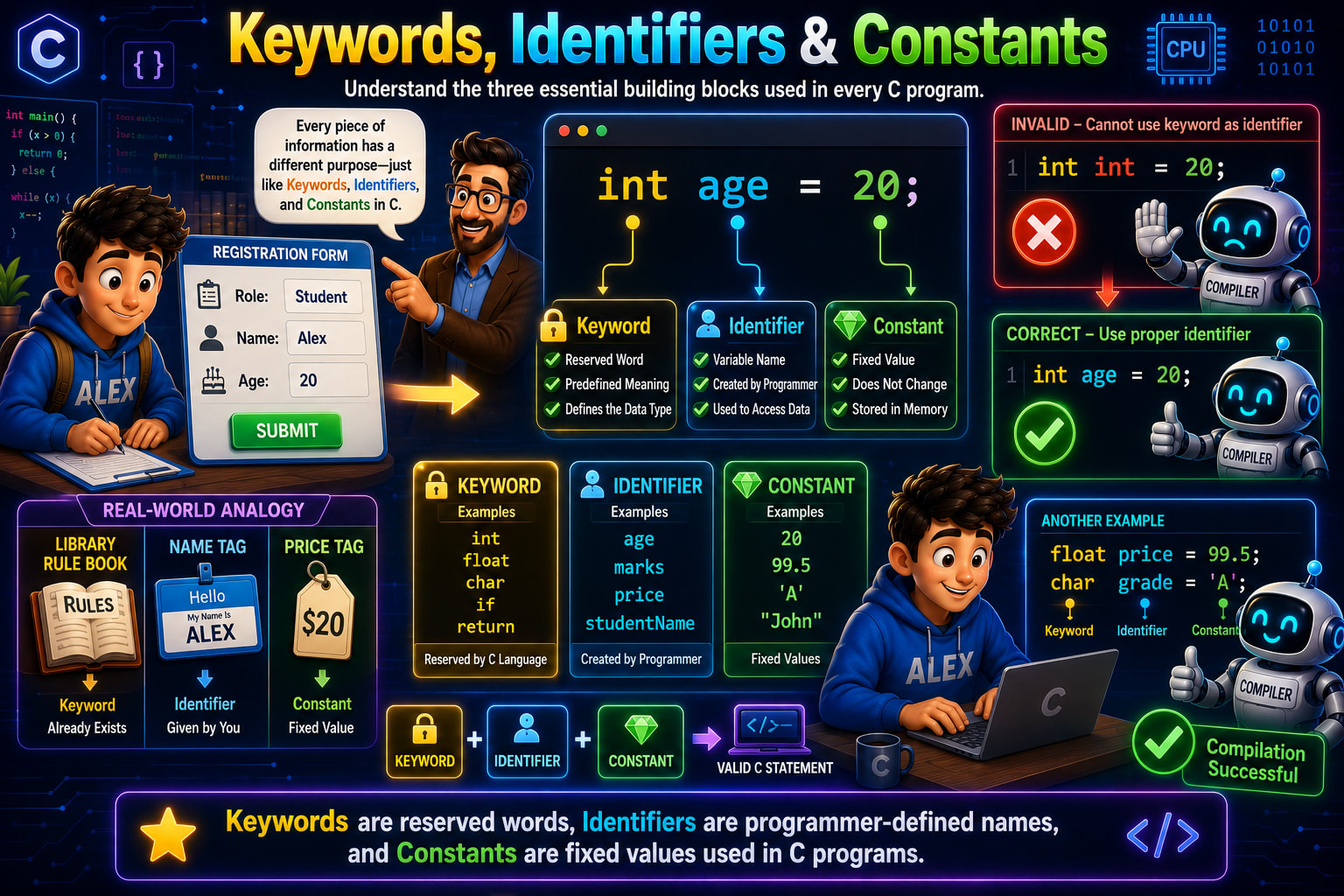
If you look at the infographic, the statement
int age = 20;
is divided into three different parts.
int→ Keywordage→ Identifier20→ Constant
Although this is just one line of code, each of these parts has a completely different purpose. Think of them as different members of a team. One tells the compiler what type of data you're working with, another gives that data a name, and the last one provides the actual value.
By the end of this lesson, you'll understand exactly what each of these terms means, how they work together, and why confusing them is one of the most common beginner mistakes.
Understanding the Registration Form Example
Before jumping into code, let's first understand the real-world example shown on the left side of the infographic.
Alex is filling out a registration form that contains fields like:
Role : Student
Name : Alex
Age  : 20
Think about it for a moment.
Every piece of information has a different purpose.
Student tells us the role.
Alex identifies the person.
20 represents the person's age.
Programming works in exactly the same way.
Every piece of information inside a program has a specific role. Some words are reserved by the C language itself, some are names created by the programmer, and some are fixed values.
That's why C divides them into three categories:
Keywords
Identifiers
Constants
Breaking Down the Statement
Let's look at the statement shown in the center of the infographic.
int age = 20;
Although it's a single statement, it actually contains three different types of information.
int   → Keyword
age   → Identifier
20    → Constant
Let's understand each one individually.
What is a Keyword?
The first part is
int
This is a Keyword.
A keyword is a word that already has a predefined meaning in the C language.
When the compiler reads
int
it immediately understands that you're declaring an integer variable.
Notice something important.
You didn't invent the word int.
It already existed before you started writing the program.
That's why keywords are also called reserved words.
The infographic mentions three important characteristics of keywords.
Reserved Word
Predefined Meaning
Defines the Data Type
These three points summarize keywords perfectly.
Why Are Keywords Reserved?
Imagine a library.
The library already has a rule book.
You cannot walk into the library and decide to rewrite those rules.
The rules already exist.
That's exactly why the infographic compares keywords to a Library Rule Book.
Keywords belong to the C language itself.
The programmer cannot change their meaning.
For example,
int
will always represent the integer data type.
Similarly,
float
will always represent floating-point numbers.
Their meanings never change.
Common Keywords in C
Some of the most frequently used keywords are:
int
float
char
if
else
for
while
return
break
continue
switch
void
Every one of these has a predefined purpose inside the language.
Whenever the compiler encounters one of these words, it immediately knows what operation is being performed.
What is an Identifier?
Now let's move to the second part of the statement.
age
This is called an Identifier.
Unlike keywords, identifiers are not predefined.
They are created by the programmer.
An identifier is simply a name used to identify something inside a program.
In this example,
age
is the name of a variable.
Tomorrow you could write
marks
or
salary
or
studentName
These are all identifiers because they are names chosen by the programmer.
The infographic highlights three important characteristics of identifiers.
Variable Name
Created by Programmer
Used to Access Data
Whenever you want to access the stored value, you use the identifier.
Real-Life Analogy for Identifiers
Look at the name tag shown in the infographic.
Imagine you're attending a conference.
Everyone wears a name tag.
One person has
Alex
Another has
John
The name tag doesn't change who the person is.
It simply helps everyone identify them.
Identifiers work the same way.
They don't store information by themselves.
They simply give a meaningful name to the data stored in memory.
Rules for Naming Identifiers
Although you can choose meaningful names, C follows certain rules.
A valid identifier:
Can contain letters
Can contain digits
Can contain underscores
Must begin with a letter or underscore
Cannot contain spaces
Cannot contain special symbols
Cannot be a keyword
Valid examples:
age
studentName
total_marks
price1
Invalid examples:
1age
student age
marks@
int
float
A good identifier should also describe the data it stores. Names like age, marks, and studentName are much easier to understand than names like a, x, or temp1.
What is a Constant?
Now let's look at the final part of the statement.
20
This is called a Constant.
A constant is simply a fixed value.
Unlike variables, constants do not change by themselves.
In the statement
int age = 20;
the value
20
is an integer constant.
The infographic describes constants using three points.
Fixed Value
Does Not Change
Stored in Memory
Whenever the compiler sees 20, it understands that this value is fixed.
Different Types of Constants
Constants aren't limited to integers.
The infographic shows another example.
float price = 99.5;

char grade = 'A';
Here,
99.5
is a floating-point constant.
'A'
is a character constant.
Similarly,
"John"
is a string constant.
Some common examples are:
100
250
99.5
3.14
'A'
"Hello"
All of these represent fixed values.
Putting Everything Together
Now let's revisit our original statement.
int age = 20;
Here's what each part represents.
int   → Keyword

age   → Identifier

20    → Constant
The keyword tells the compiler what type of data will be stored.
The identifier gives that data a meaningful name.
The constant provides the actual value.
Without any one of these, the statement would be incomplete.
Why Can't We Use Keywords as Identifiers?
The infographic shows an incorrect example.
int int = 20;
At first glance, this may look okay.
But the compiler immediately reports an error.
Why?
Because
int
already has a predefined meaning.
It cannot simultaneously become the name of a variable.
The compiler gets confused.
Should the first int represent the data type?
Should the second int represent the variable name?
Since keywords are reserved, the compiler rejects the statement.
That's why this example is marked as Invalid in the infographic.
The Correct Way
Instead, we should write
int age = 20;
Now everything becomes clear.
int   → Data Type

age   → Variable Name

20    → Value
The compiler understands the statement without any confusion, and the program compiles successfully.
Another Example
The infographic also includes another declaration.
float price = 99.5;

char grade = 'A';
Let's identify each part.
For the first statement:
float  → Keyword

price  → Identifier

99.5   → Constant
For the second statement:
char   → Keyword

grade  → Identifier

'A'    → Constant
Although the values and variable names change, the pattern remains exactly the same.
How the Compiler Reads These Statements
When the compiler scans your program, it doesn't simply read an entire line.
Instead, it recognizes each token individually.
For example,
float price = 99.5;
The compiler processes it like this:
Keyword

↓

Identifier

↓

Operator

↓

Constant

↓

Special Symbol
Once every token follows the rules of the C language, the compiler successfully converts your program into machine code.
That's why the infographic shows the robot giving a thumbs-up with the message Compilation Successful.
Common Beginner Mistakes
One of the most common mistakes is using a keyword as an identifier.
int int = 20;
This is invalid because int is reserved by the C language.
Another common mistake is choosing meaningless variable names.
Instead of writing
int x = 20;
it's much better to write
int age = 20;
because anyone reading the code immediately understands what the value represents.
Beginners also confuse variables with constants. Remember, the identifier is the name, while the constant is the actual value stored in memory.
Interview Questions
1. What is a keyword in C?
A keyword is a reserved word that has a predefined meaning in the C language.
2. What is an identifier?
An identifier is a programmer-defined name used to identify variables, functions, arrays, and other program elements.
3. What is a constant?
A constant is a fixed value that does not change during program execution.
4. Can a keyword be used as an identifier?
No. Keywords are reserved by the C language and cannot be used as variable names.
5. Identify the keyword, identifier, and constant in the following statement:
float price = 99.5;
float→ Keywordprice→ Identifier99.5→ Constant
Quick Recap
Let's summarize everything you've learned.
Keywords are reserved words provided by the C language with predefined meanings.
Identifiers are meaningful names created by the programmer to identify variables and other program elements.
Constants are fixed values such as numbers, characters, and strings.
In the statement
int age = 20;,intis the keyword,ageis the identifier, and20is the constant.Keywords cannot be used as identifiers because they are already reserved by the language.
Choosing clear and meaningful identifiers makes your programs easier to read, understand, and maintain.
Now that you understand the difference between Keywords, Identifiers, and Constants, you're ready to learn about the next important type of token in C: Operators, where you'll discover how C performs calculations, comparisons, assignments, and logical operations.