Every JavaScript program starts with variables. Whether you're storing a user's name, score, age, login status, or even an entire list of products, variables are what make it possible.
Think about any app you use every day. Instagram stores your username, YouTube stores your watch history, WhatsApp stores your messages, and games store your score. All of this data needs a place to live while the program is running.
That's exactly what a variable is.
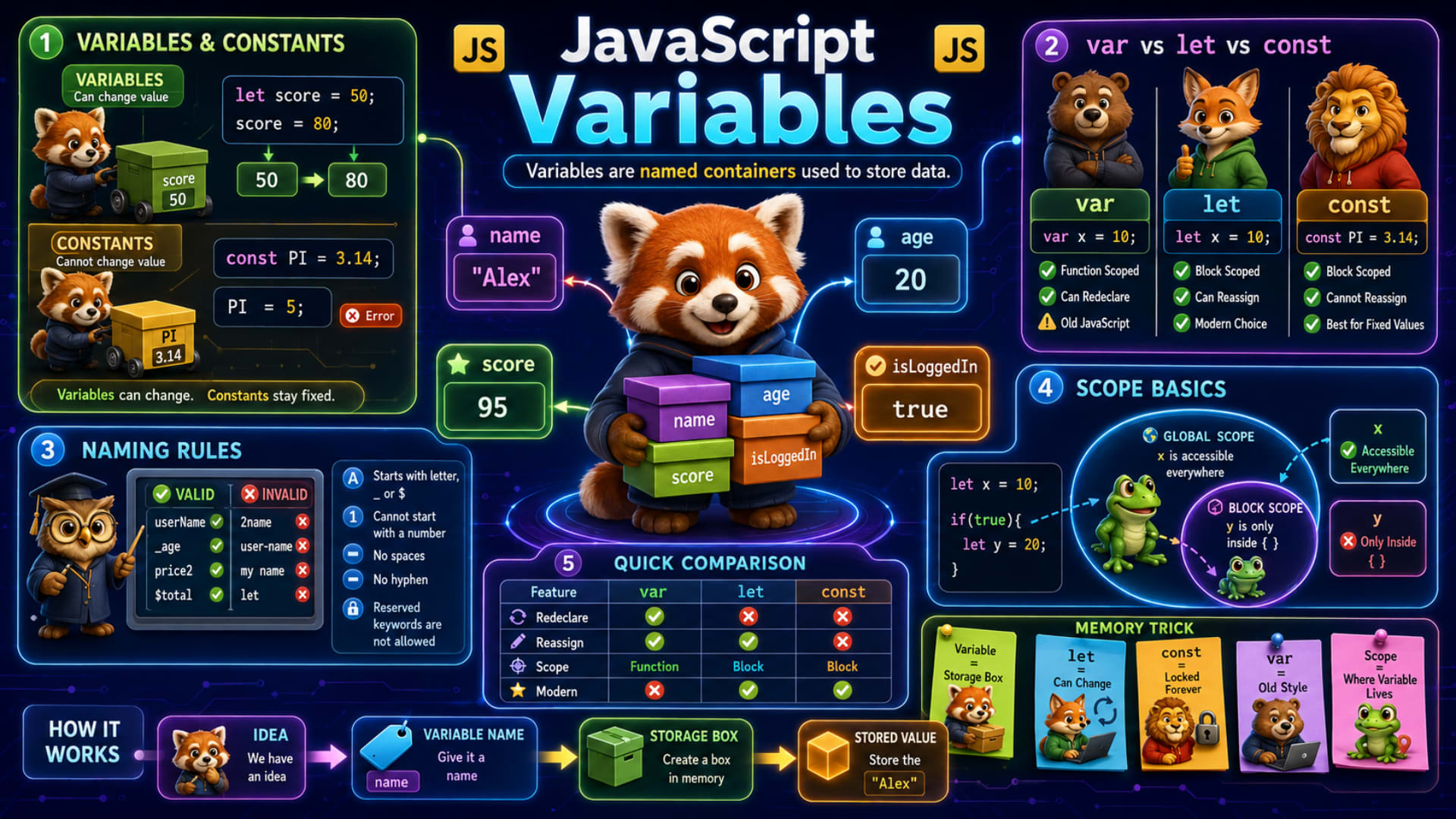
As shown in the slide, variables are named containers used to store data.
Imagine a storage box. You give the box a name, and then you can put something inside it. Later, whenever you need that value, you simply use the box's name.
In the center of the slide, our little red panda is holding four storage boxes:
name→"Alex"age→20score→95isLoggedIn→true
Each box has a name and stores a value.
How Variables Work
Let's understand what actually happens when JavaScript creates a variable.
The slide explains it using a simple flow.
Idea
   ↓
Variable Name
   ↓
Storage Box
   ↓
Stored Value
Suppose you want to store someone's name.
let name = "Alex";
Here's what happens step by step.
Step 1: You decide you need to remember someone's name.
Step 2: You choose a variable name.
name
Step 3: JavaScript creates a small storage location in memory.
Step 4: It stores the value.
"Alex"
Now whenever you write
console.log(name);
JavaScript looks inside the storage box called name and prints
Alex
The same idea applies to every variable.
let age = 20;
let score = 95;
let isLoggedIn = true;
Each variable stores a different type of information.
Variables
Variables are values that can change later.
The slide shows this example.
let score = 50;

score = 80;
Let's understand it.
Initially,
score
↓
50
Later,
score = 80;
The old value 50 is replaced by 80.
Now the variable stores
score
↓
80
Notice something important.
The variable name stays the same.
Only the value changes.
That's why they're called variables—because their values can vary.
Imagine a whiteboard.
Morning:
Today's Visitors
50
Evening:
Today's Visitors
80
The heading doesn't change.
Only the number changes.
Variables work exactly like that.
Constants
Sometimes we have values that should never change.
For example,
π (Pi)
Number of days in a week
App version
API URL
Company name
These are stored using constants.
The slide uses this example.
const PI = 3.14;
Now imagine trying this.
PI = 5;
JavaScript immediately gives an error.
Why?
Because const means
"This value is fixed."
Once assigned, it cannot be replaced.
Think of it as writing something with permanent marker instead of pencil.
A pencil can be erased.
A permanent marker cannot.
That's exactly the difference between let and const.
var, let, and const
JavaScript gives us three different ways to create variables.
var
let
const
Although they all store data, they behave differently.
Let's understand each one.
var
var x = 10;
var is the old way of declaring variables.
It existed long before let and const were introduced.
The slide highlights these characteristics.
✔ Function Scoped
✔ Can be Redeclared
✔ Used in older JavaScript
Example:
var city = "Delhi";

var city = "Mumbai";
This works.
Because var allows redeclaration.
Although it still works today, modern JavaScript developers rarely use it because it can lead to confusing bugs.
let
let x = 10;
let is the modern choice for variables whose values may change.
The slide points out:
✔ Block Scoped
✔ Can Reassign
✔ Recommended for modern JavaScript
Example:
let score = 50;

score = 80;
Perfectly valid.
But this is not allowed.
let score = 50;
let score = 80;
You cannot declare the same let variable twice in the same scope.
const
const PI = 3.14;
The slide says:
✔ Block Scoped
✔ Cannot Reassign
✔ Best for fixed values
Example:
const country = "India";
Later,
country = "USA";
This gives an error.
Whenever a value should stay fixed, prefer const.
Interestingly, most modern JavaScript developers use const by default and switch to let only when they know the value needs to change.
Naming Rules
Choosing good variable names is just as important as writing good code.
The slide shows both valid and invalid examples.
Valid Names
userName
_age
price2
$total
These work because they follow JavaScript's naming rules.
Invalid Names
2name
user-name
my name
let
These are invalid for different reasons.
Let's understand why.
Rule 1: Must Start With a Letter, _, or $
Correct
let userName;
let _age;
let $total;
Incorrect
let 2name;
Variable names cannot begin with numbers.
Rule 2: No Spaces
Wrong
let my name;
Correct
let myName;
JavaScript usually follows camelCase, where the first word starts with a lowercase letter and each following word starts with a capital letter.
Examples:
firstName
totalMarks
isLoggedIn
Rule 3: No Hyphen
Wrong
user-name
JavaScript thinks - is the subtraction operator.
Correct
userName
Rule 4: Reserved Keywords Cannot Be Used
This is invalid.
let let = 5;
Words like
ifforwhilereturnclassfunctionconstlet
already have special meanings in JavaScript.
They cannot be used as variable names.
Rule 5: Variable Names Are Case Sensitive
These are three different variables.
let age = 20;
let Age = 25;
let AGE = 30;
JavaScript treats all three as separate names.
Differences Between var, let, and const
The slide provides a quick comparison.
Feature | var | let | const |
|---|---|---|---|
Redeclare | ✅ Yes | ❌ No | ❌ No |
Reassign | ✅ Yes | ✅ Yes | ❌ No |
Scope | Function | Block | Block |
Recommended Today | ❌ No | ✅ Yes | ✅ Yes |
A simple rule to remember:
Use
constwhenever the value should stay the same.Use
letif the value will change.Avoid
varunless you're working with older JavaScript code.
Scope Basics
One of the most important concepts shown on the slide is scope.
Scope simply means:
Where can a variable be accessed?
The slide uses this example.
let x = 10;

if (true) {
    let y = 20;
}
Here,
x is created outside the if block.
So it can be accessed throughout the surrounding scope.
But y is created inside the curly braces.
That means it only exists inside those braces.
This will work.
if (true) {
    let y = 20;
    console.log(y);
}
But this won't.
console.log(y);
JavaScript says:
ReferenceError
because y only lives inside the block where it was created.
Think of scope like rooms in a house.
A variable created in the living room can't automatically be used inside a locked bedroom.
The slide also illustrates this with:
Global Scope → accessible almost everywhere in your program.
Block Scope → accessible only inside
{ }.
This is one of the biggest reasons let and const are safer than var.
A Few Extra Things Worth Knowing
Although not shown directly on the slide, these are important concepts you'll encounter often.
Declare First, Use Later
It's good practice to declare variables before using them.
let username = "Alex";

console.log(username);
const Objects Can Still Change Internally
This surprises many beginners.
const user = {
    name: "Alex"
};

user.name = "John";
This works because the object itself isn't being replaced. Only one of its properties changes.
However, this is not allowed.
user = {};
because that tries to assign a completely new object to the constant.
Use Meaningful Variable Names
Instead of
let x = 25;
prefer
let userAge = 25;
Good names make your code much easier to read and maintain.
Quick Revision
Topic | Remember |
|---|---|
Variable | A named container that stores data. |
| Use when the value can change. |
| Use when the value should never be reassigned. |
| Older declaration method; generally avoid in modern code. |
Redeclare | Only |
Reassign |
|
Scope |
|
Naming Rules | Start with a letter, |
Best Practice | Prefer |