Operators in Java: The Exam Result Story
Hey, let's talk about something that quietly powers almost every single line of code you'll ever write — operators. I promise you, by the end of this article, you'll never look at a + or a >= the same way again. Because instead of throwing a list of symbols at you, I want to walk you through a story you've probably lived through yourself.
Let's Start With Something You've Actually Done
Remember John? We met him earlier when we talked about variables — the guy filling out his university admission form. Well, John's story isn't over yet.
His exam is done. He scored 80 marks in his internal assessment and 11 marks in his practical. His age is 20. And now, sitting right there with his teacher, there's one big question hanging in the air:
"Did John pass or not?"
Now think about this for a second. How do you, as a human, figure that out? You'd probably:
Add up his marks — 80 + 11
Compare the total against the passing marks
Decide — pass or fail
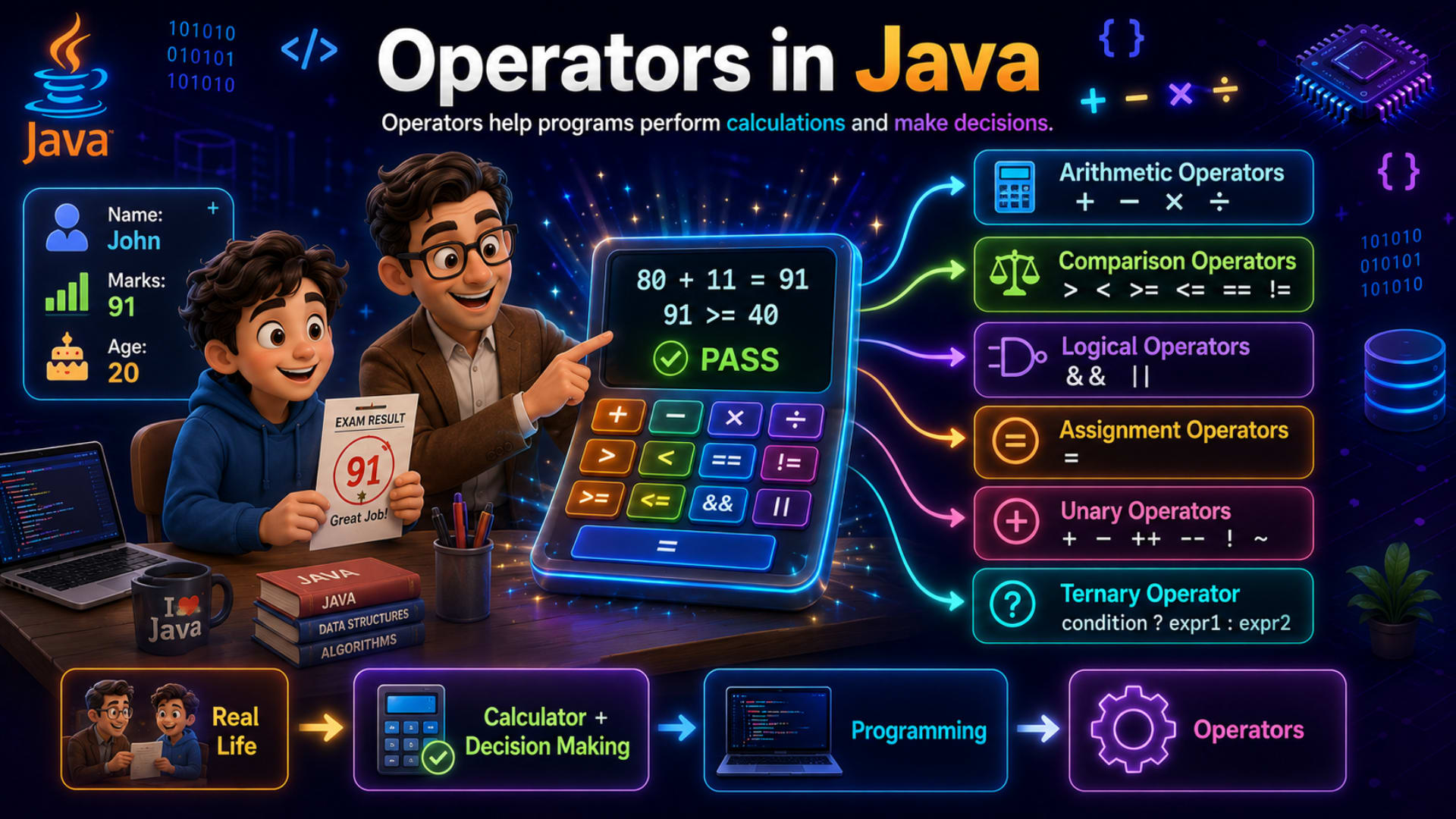
That's exactly what's happening in the picture. John and his teacher are sitting at a desk, and right in front of them is a calculator. On its screen:
80 + 11 = 91
91 >= 40
✔ PASS
Notice something interesting here. This isn't just a calculator doing math. It's doing two very different jobs. First, it's calculating something — adding two numbers together. Then, it's deciding something — checking whether 91 is greater than or equal to 40.
That calculator, in a nutshell, is exactly what an operator is in programming.
Connecting Real Life to Programming
Here's the important part. Every single day, without even realizing it, you calculate things and you make decisions.
You calculate your total bill at a store.
You decide whether you have enough money to pay it.
You calculate how many hours of sleep you got.
You decide whether you're late for class or not.
Calculation and decision-making — these two things are everywhere in real life. And guess what? These are also the two things a computer program needs to do constantly.
So how does a Java program calculate John's total marks? How does it decide whether he passed? It uses operators.
Look at the bottom of the infographic — there's a flow that tells you the whole story in four boxes:
Real Life → Calculator + Decision Making → Programming → Operators
That arrow is basically saying: everything you do in real life with a calculator and a decision, Java does the exact same thing using operators. That's the whole idea. Let's lock that in before we go further.
What Exactly Is an Operator?
Now that you've seen the story, here's the definition:
An operator is a special symbol in Java that performs an operation on values or variables — like calculations, comparisons, or decisions.
Let's break that sentence down word by word, because every word matters.
Special symbol — things like
+,-,>=,&&. These aren't letters or words; they're symbols with a specific job.Performs an operation — an operation just means "does something." Adding is an operation. Comparing is an operation.
On values or variables — operators don't work alone. They always work on something — two numbers, a variable and a value, two conditions, and so on.
So when we write 91 >= 40 in Java, the >= is the operator, and 91 and 40 are the values it's operating on.
Simple, right? Operators help programs perform calculations and make decisions — exactly like John's calculator did.
Walking Through the Infographic
Let's slow down and go through this exactly like I'd explain it on a whiteboard.
On the left, you see John's little info card:
Name: John
Marks: 91
Age: 20
Right next to him is his teacher, pointing at a big calculator screen that shows:
80 + 11 = 91
91 >= 40
PASS ✔
This screen is quietly teaching you two categories of operators already:
80 + 11 = 91— this is an arithmetic operation. It's calculating a value.91 >= 40— this is a comparison operation. It's checking a condition and giving back either true or false.
And from that calculator, six arrows branch out to the right — and each arrow is one type of operator in Java:
Arithmetic Operators —
+ − × ÷Comparison Operators —
> < >= <= == !=Logical Operators —
&& ||Assignment Operators —
=Unary Operators —
+ − ++ −− ! ~Ternary Operator —
condition ? expr1 : expr2
That's it. That's the entire operator family in Java, right there in one picture. Now let's actually build John's exam-result program in Java and meet each one of these operators properly.
Let's Actually Build This in Java
Enough theory — let's write real code and watch John's result come alive on screen.
Step 1: Start With John's Data
Before we can operate on anything, we need variables to operate on — just like the calculator needed John's marks before it could add them.
public class Main {
    public static void main(String[] args) {
        int internalMarks = 80;
        int practicalMarks = 11;
        int age = 20;
        int passingMarks = 40;
    }
}
Nothing fancy here — just four variables holding John's raw data, exactly like the info card in the image. Now let's put operators to work.
Step 2: Arithmetic Operators — Doing the Calculation
The first thing the calculator did was add John's marks together. In Java, that's the job of arithmetic operators.
int totalMarks = internalMarks + practicalMarks;
System.out.println(totalMarks);
Output:
91
Look carefully at that + sign. It's not text, it's not a variable — it's a symbol that tells Java "take the value in internalMarks, take the value in practicalMarks, and combine them." Java does exactly what the calculator did — 80 + 11 = 91.
Arithmetic operators in Java are:
Operator | Meaning | Example | Result |
|---|---|---|---|
| Addition |
|
|
| Subtraction |
|
|
| Multiplication |
|
|
| Division |
|
|
| Modulus (remainder) |
|
|
A lot of beginners make this mistake: they assume / always gives a decimal answer. But if both numbers are int, Java gives you an int back too — so 91 / 2 gives 45, not 45.5. We'll leave that detail for the data types chapter, but keep it in the back of your mind.
Step 3: Comparison Operators — Making the Decision
Now here's where it gets interesting. John has 91 marks. But a number alone doesn't tell you pass or fail — you need to compare it against something. That's exactly what the second line on the calculator does:
91 >= 40
In Java:
boolean result = totalMarks >= passingMarks;
System.out.println(result);
Output:
true
Notice something interesting here — the >= operator doesn't calculate a new number. It answers a yes-or-no question: "Is totalMarks greater than or equal to passingMarks?" And that answer always comes back as a boolean — either true or false.
This is exactly why we needed the boolean data type when we studied variables. Comparison operators are the reason boolean exists in the first place.
Here are all the comparison operators, side by side with John's numbers:
Operator | Meaning | Example | Result |
|---|---|---|---|
| Greater than |
|
|
| Less than |
|
|
| Greater than or equal to |
|
|
| Less than or equal to |
|
|
| Equal to |
|
|
| Not equal to |
|
|
Here's the important part — == is a comparison, and = is something completely different. We'll get to that in the common mistakes section, because it's one of the most famous beginner traps in all of programming.
Step 4: Logical Operators — Combining Conditions
Now suppose passing the exam isn't just about marks. Suppose John's college also needs him to be at least 18 years oldto be eligible for the certificate. Now we have two conditions to check at once:
Did he score enough marks?
Is he old enough?
This is where logical operators step in — they let you combine multiple true/false conditions into a single decision.
boolean hasPassingMarks = totalMarks >= passingMarks;
boolean isEligibleAge = age >= 18;

boolean isFullyEligible = hasPassingMarks && isEligibleAge;
System.out.println(isFullyEligible);
Output:
trueThe && symbol means AND — both conditions have to be true for the whole thing to be true. If John was 17, isEligibleAge would be false, and no matter how good his marks were, isFullyEligible would also become false.
There's also ||, which means OR — only one of the conditions needs to be true:
boolean specialCase = (totalMarks >= 90) || (age >= 21);
And there's !, which simply flips a boolean — turns true into false and vice versa:
boolean hasNotFailed = !(totalMarks < passingMarks);
Operator | Meaning | Example |
|---|---|---|
| AND — both must be true |
|
| OR — at least one must be true |
|
| NOT — reverses the value |
|
Step 5: Assignment Operators — Putting Values in the Box
We've already been quietly using one assignment operator this whole time — the = sign, back when we said int totalMarks = 91. That's the most basic assignment operator there is: it takes a value and pours it into a variable's box.
But Java gives us shortcuts too. Suppose John retakes a small internal test and earns 5 bonus marks. Instead of writing this:
totalMarks = totalMarks + 5;
Java lets you write this instead:
totalMarks += 5;
System.out.println(totalMarks);
Output:
96Same result, shorter code. += means "take the current value, add this, and store it back." This is exactly how the "Real Life" story continues — John's marks change, just like we saw variables change in the previous chapter, and the operator is what actually performs that change.
Operator | Meaning | Same As |
|---|---|---|
| Assign |
|
| Add and assign |
|
| Subtract and assign |
|
| Multiply and assign |
|
| Divide and assign |
|
Step 6: Unary Operators — Working on a Single Value
Every operator we've seen so far worked on two values — 80 + 11, totalMarks >= passingMarks. But some operators only need one value to do their job. These are called unary operators, and "uni" literally means one.
The most common one you'll see constantly is ++, which simply increases a number by 1.
int attempts = 1;
attempts++;
System.out.println(attempts);
Output:
2
Think of it like John retaking a quiz — attempts++ is Java's shorthand for "add one more attempt." There's also --, which does the opposite — subtracts 1.
Operator | Meaning | Example |
|---|---|---|
| Positive value |
|
| Negative value |
|
| Increment by 1 |
|
| Decrement by 1 |
|
| Logical NOT |
|
Step 7: The Ternary Operator — A Decision in One Line
Now here's where everything we've learned comes together beautifully. Remember the calculator's final line?
✔ PASS
That word — "PASS" — didn't come out of nowhere. Somewhere, a decision was made: if the condition is true, show PASS, otherwise show FAIL. Normally, you'd need several lines to write that logic. But Java gives us a neat one-line shortcut called the ternary operator.
String status = (totalMarks >= passingMarks) ? "PASS" : "FAIL";
System.out.println("Result : " + status);
Output:
Result : PASS
Let's slow down and really look at this line, because it looks intimidating the first time you see it:
condition ? expr1 : expr2
condition— istotalMarks >= passingMarkstrue or false??— "if the condition is true, then..."expr1—"PASS"— this is what you get if the condition is true:— "otherwise..."expr2—"FAIL"— this is what you get if the condition is false
It's called "ternary" because it's the only operator in Java that works on three parts at once — the condition, the true-result, and the false-result. This single line does the exact job that John's calculator screen was showing.
Bringing It All Together — John's Full Result Program
Let's now write the complete program, using every operator we just learned, all working on the same story.
public class Main {
    public static void main(String[] args) {
        // Step 1: John's raw data
        int internalMarks = 80;
        int practicalMarks = 11;
        int age = 20;
        int passingMarks = 40;

        // Step 2: Arithmetic operator - calculate total
        int totalMarks = internalMarks + practicalMarks;

        // Step 3: Comparison operator - check passing marks
        boolean hasPassingMarks = totalMarks >= passingMarks;

        // Step 4: Logical operator - check age eligibility too
        boolean isEligibleAge = age >= 18;
        boolean isFullyEligible = hasPassingMarks && isEligibleAge;

        // Step 5: Assignment operator - add bonus marks
        totalMarks += 5;

        // Step 6: Unary operator - track attempt number
        int attempts = 1;
        attempts++;

        // Step 7: Ternary operator - final decision
        String status = (totalMarks >= passingMarks) ? "PASS" : "FAIL";

        System.out.println("Total Marks : " + totalMarks);
        System.out.println("Eligible : " + isFullyEligible);
        System.out.println("Attempts : " + attempts);
        System.out.println("Result : " + status);
    }
}
Output:
Total Marks : 96
Eligible : true
Attempts : 2
Result : PASS
Look at what just happened. Every single operator type from the infographic — arithmetic, comparison, logical, assignment, unary, and ternary — played its own small role, and together they turned four raw numbers into a real, human-readable result: PASS. That's the entire power of operators in one program.
Common Mistakes Beginners Make
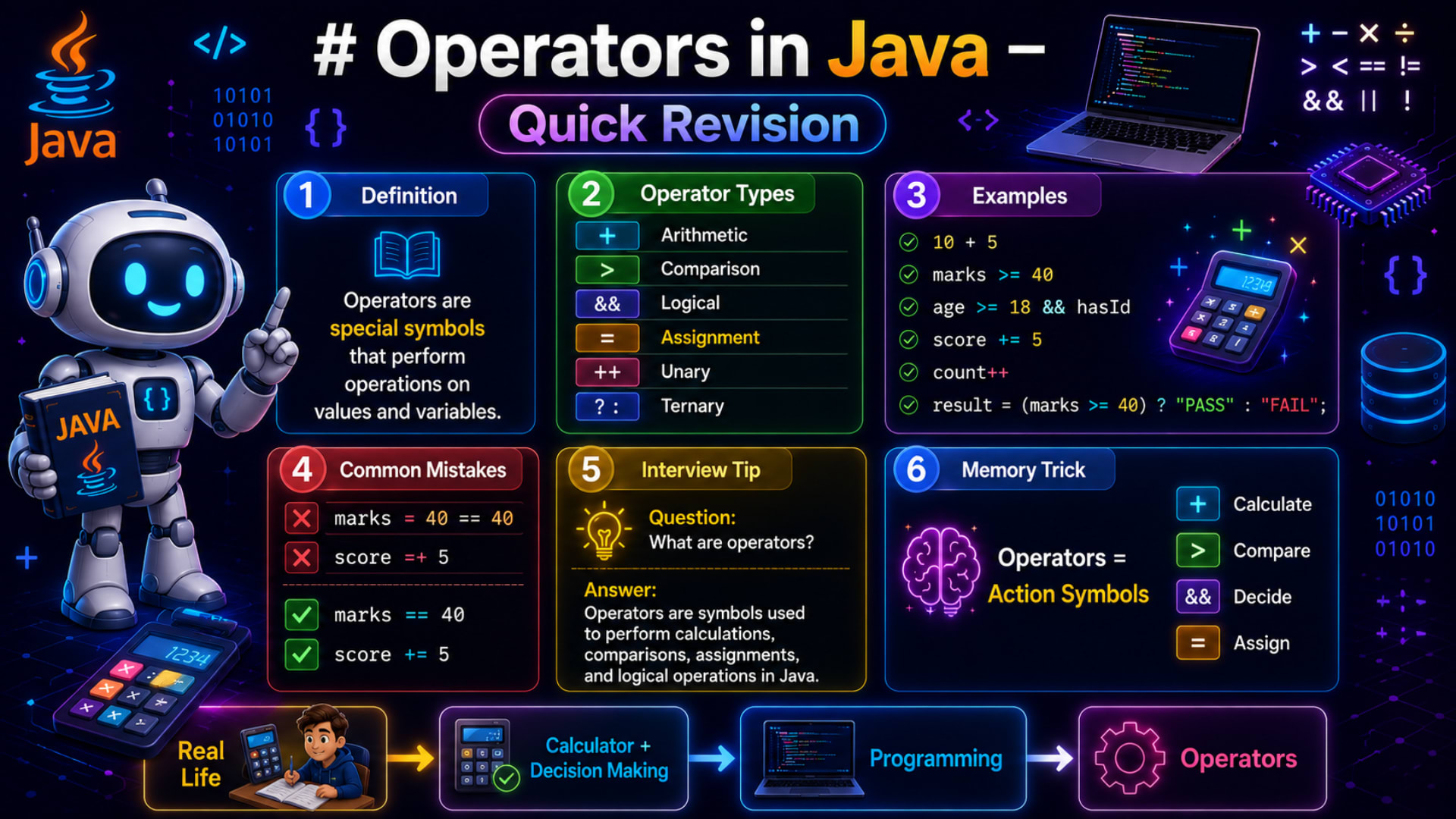
The quick revision image calls these out directly, and honestly, almost every Java beginner falls into these traps at least once.
Mistake 1: Confusing = and ==
// ❌ Wrong
if (marks = 40) {
This looks like a comparison, but = is the assignment operator, not comparison. Writing marks = 40 tries to store 40 into marks, not check if marks equals 40. Java will usually stop you with a compile error here, but the confusion is extremely common because both symbols look so similar.
// ✅ Correct
if (marks == 40) {
Here's a simple way to remember it: single = gives a value, double == asks a question.
Mistake 2: Writing Compound Assignment Backwards
// ❌ Wrong
score =+ 5;
This one is sneaky because it actually compiles — but it doesn't do what you think. =+ 5 is read by Java as "assign positive 5," completely wiping out whatever was in score before, instead of adding 5 to it.
// ✅ Correct
score += 5;
The order matters. += means "add and assign." =+ means "assign a positive value." One character swapped, completely different result — so always double check the direction of your compound operators.
Interview Tip
If you ever get asked in an interview, "What are operators in Java?" — here's a clean, confident answer:
"Operators are special symbols in Java used to perform operations on values and variables — including calculations, comparisons, assignments, and logical decisions."
You can strengthen your answer by naming the six categories in order — arithmetic, comparison, logical, assignment, unary, and ternary — and giving one quick example of each, just like we did with John's exam result. Interviewers love it when you can connect a definition to a real example on the spot, because it shows you actually understand the concept instead of memorizing it.
Best Practices for Using Operators
Use parentheses generously. Even when not strictly required, wrapping conditions like
(totalMarks >= passingMarks)makes your intent obvious to anyone reading the code — including future you.Never confuse
=with==. If yourifcondition looks like it's assigning something, stop and check.Prefer compound assignment operators (
+=,-=) over the longer form when updating a variable — it's shorter, cleaner, and reduces the chance of typos.Don't overuse the ternary operator. It's great for simple true/false decisions like PASS/FAIL, but if the logic starts getting complicated, a normal
if-elseis easier to read.Name your boolean variables clearly, like
hasPassingMarksorisEligibleAge, so your logical operators read almost like plain English.
Try It Yourself
Before you move on, here's a small exercise using John's exact same story. This time, John has a friend, and you'll compare their results.
int johnMarks = 91;
int friendMarks = 85;
int passingMarks = 40;
Using the operators you just learned, try to:
Find the difference between John's marks and his friend's marks (arithmetic).
Check whether both of them passed (comparison + logical
&&).Add 3 bonus marks to the friend's score using a compound assignment operator.
Use the ternary operator to print
"PASS"or"FAIL"for the friend.
Don't jump to the answer — try writing it yourself first. That's exactly how these operators start feeling natural.
Quick Revision
Here's everything from the Quick Revision infographic, summarized cleanly.
1. Definition Operators are special symbols that perform operations on values and variables.
2. Operator Types
Symbol | Category |
|---|---|
| Arithmetic |
| Comparison |
| Logical |
| Assignment |
| Unary |
| Ternary |
3. Examples
10 + 5
marks >= 40
age >= 18 && hasId
score += 5
count++
result = (marks >= 40) ? "PASS" : "FAIL";
4. Common Mistakes
❌ Wrong | ✅ Correct |
|---|---|
|
|
|
|
5. Interview Tip Q: What are operators? A: Operators are symbols used to perform calculations, comparisons, assignments, and logical operations in Java.
6. Memory Trick
Operators = Action Symbols
+Calculate ·>Compare ·&&Decide ·=Assign
Final Thoughts
Let's rewind back to where we started — John, his teacher, and that glowing calculator screen. 80 + 11 = 91. 91 >= 40. PASS. Three tiny lines, but they hold the entire idea of operators inside them: calculate something, compare something, decide something.
Every time you write +, >=, &&, or ?: in Java from now on, picture that same calculator. You're not just typing symbols — you're calculating and deciding, exactly the way you do every single day in real life. That's the whole secret behind operators, and now that it's clicked, everything you build next in Java — conditions, loops, and beyond — is going to feel like a natural extension of this one simple idea.