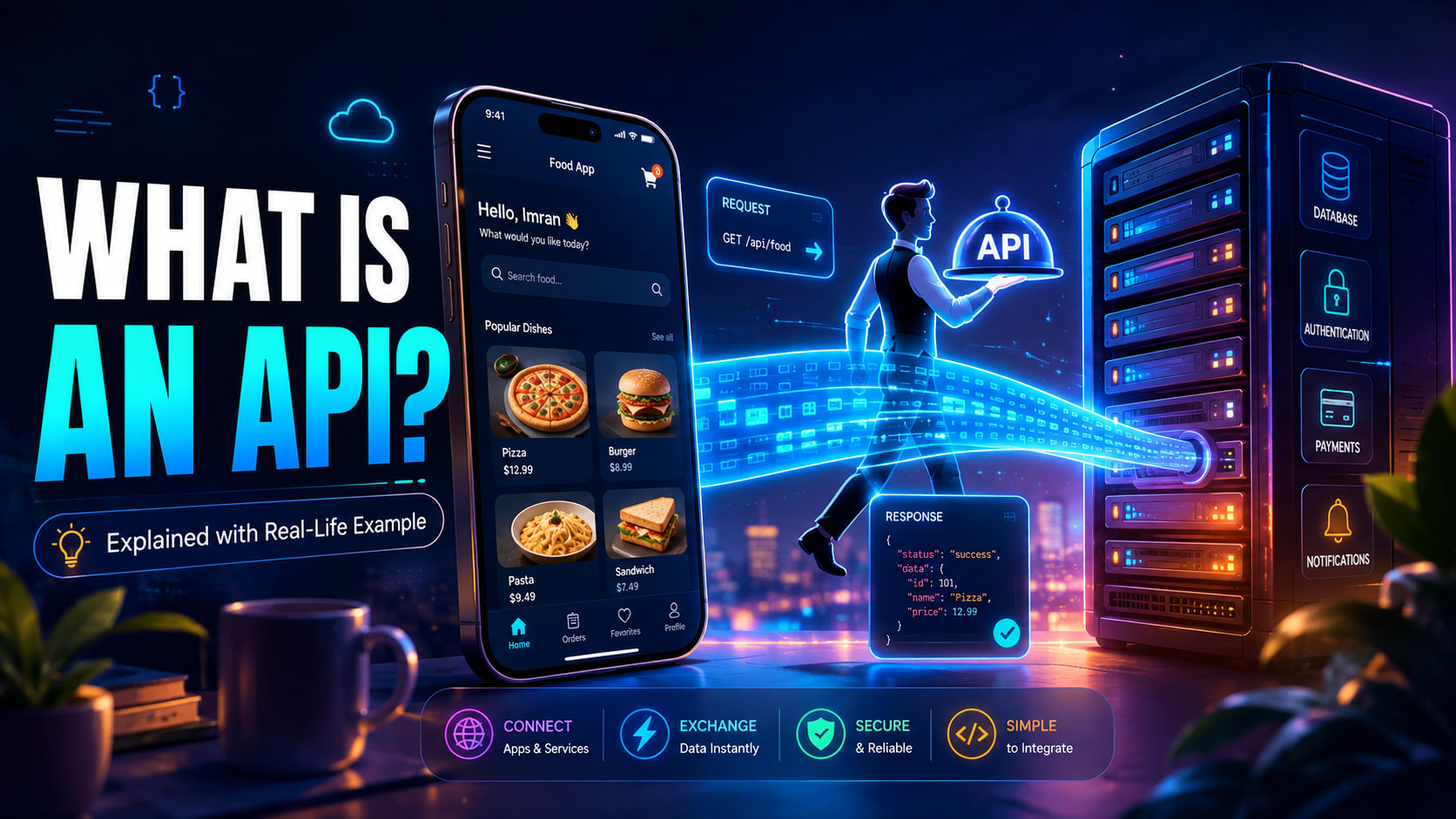
You've probably heard the word "API" thrown around in every tutorial, job description and YouTube video about programming. Someone casually says "just call the API" like it's the most obvious thing in the world, and you nod along while quietly wondering what that even means. So let's fix that today, properly. The question what is an API has a genuinely simple answer once you stop reading the textbook definition and start thinking about how software actually talks to other software.
Here's the short version before we go deeper. An API is a messenger. It carries your request somewhere, gets the result, and brings it back to you. Everything else you'll eventually learn — endpoints, JSON, status codes, tokens, rate limits — is just detail layered on top of that one idea.
So, What Is an API in Simple Words?
API stands for Application Programming Interface, which is one of those names that explains almost nothing to a beginner. A far more useful way to think about it is this: an API is a set of rules that lets one piece of software ask another piece of software to do something, without needing to know how that other software works internally.
That last part matters much more than people realize. When your weather app shows tomorrow's forecast, it doesn't contain satellites or meteorological models. It simply asks a weather service, "what's the forecast for Kolkata tomorrow?" and gets an answer back. The app has no idea how that number was calculated, and it doesn't need to. That separation between asking and doing is the entire point of an API.
The Restaurant Analogy That Makes APIs Click
Think about walking into a restaurant. You sit down, look at the menu, and decide you want a plate of biryani. Now, you don't get up, walk into the kitchen, and start explaining your order to the chef while he's holding a hot pan. That would be chaos, and honestly the restaurant wouldn't allow it in the first place.
Instead, you tell the waiter. The waiter carries your order to the kitchen, the kitchen prepares the food, and the waiter brings the result back to your table. In this story, the waiter is the API. The menu is the documentation that tells you exactly what you're allowed to order and how to ask for it. The kitchen is the server, doing all the work you never see.
Here's the interesting part, and it's the reason developers genuinely love this pattern. Because the waiter exists as a middle layer, the kitchen can completely change how it operates. The restaurant can hire a new chef, install a new oven, or reorganize its entire workflow. You wouldn't notice or care, as long as ordering biryani still gets you biryani. That's exactly how software works too — a backend team can rewrite everything internally, and as long as the API contract stays the same, every app depending on it keeps running perfectly.
Why Do APIs Even Exist?
Let's say you're building a food delivery app. You'll need maps for tracking, payments for checkout, SMS for order updates, and a login system. Without APIs, you would have to build a mapping system from scratch, become a licensed payment processor, and set up telecom infrastructure. That's not a weekend project — that's four separate companies.
Instead, you plug into Google Maps for location, Razorpay or Stripe for payments, an SMS gateway for notifications, and Google Sign-In for authentication. Each of these services hands you an API, and suddenly a two-person team can ship a product that feels enormous. APIs let developers stand on top of work that already exists rather than reinventing infrastructure that thousands of engineers have already perfected.
There's a second reason, and it's just as important inside a company. Your website, your Android app, your iOS app and maybe even a smartwatch app all need the same user data and the same business rules. Rather than writing that logic four separate times and watching the four versions slowly drift apart, you write one backend API and let all four clients talk to it. One source of truth, many interfaces. Fix a bug once, and it's fixed everywhere.
How an API Actually Works Behind the Scenes
Most APIs you'll meet as a beginner are web APIs, which means they communicate over HTTP — the exact same protocol your browser uses to load web pages. If you want the deeper picture of the layers underneath, it's worth first understanding how the web actually works behind the scenes, but the request-and-response cycle alone will take you a long way.
The Request
Your app sends a request to a specific URL called an endpoint. An endpoint is like one particular item on the restaurant menu — a precise address for one precise thing. Along with that URL you send an HTTP method that describes your intention. GET means "give me data," POST means "here's something new, save it," PUT or PATCH means "update something that already exists," and DELETE does exactly what it sounds like.
You can also attach extra information to the request. Headers carry metadata such as authentication tokens and the format you expect back, while the body carries the actual data you're sending when you create or update something. Most real APIs require some form of API key or token, because otherwise anyone on the internet could hammer their servers or read private user data.
The Response
The server receives the request, does whatever work is needed, and sends back a response — usually in JSON format. JSON is a lightweight text format that looks a lot like a JavaScript object, and both humans and machines read it comfortably. Along with the data, the server includes a status code that tells you how things went. 200 means success, 201 means something was created, 401 means you're not authenticated, 404 means it couldn't find what you asked for, and anything in the 500 range means the server itself broke.
Don't worry if these codes feel like a lot right now. In practice you'll memorize the common ones within about a week of actually building things, because you'll see them constantly in your browser console.
A Real API Example You Can Try Right Now
Let's take a concrete example in JavaScript. GitHub exposes a public API, and you can ask it about any user without even signing up. Paste this into your browser console or a Node.js file:
javascript
async function getGitHubUser(username) {
  const response = await fetch(`https://api.github.com/users/${username}`);

  if (!response.ok) {
    throw new Error(`Request failed with status ${response.status}`);
  }

  const data = await response.json();
  console.log(`${data.name} has ${data.public_repos} public repositories`);
}

getGitHubUser("octocat");
Read through what's actually happening. The fetch call sends a GET request to the endpoint https://api.github.com/users/octocat. GitHub's servers look that user up in their database, package the details as JSON, and send them back across the internet. Then response.json() converts that raw text into a normal JavaScript object your code can use like any other.
Notice the response.ok check as well, because beginners skip it constantly and then get confused when their app crashes. The request itself technically succeeded — the server answered you — but the answer might have been "that user doesn't exist." A failed request and a failed lookup are two different problems, and good code handles both separately.
Building the Other Side: A Tiny API in Node.js
Consuming an API is only half the story. Creating one is what makes the concept truly land, because you finally see both ends of the conversation. Here's a minimal working API built with Express:
javascript
const express = require("express");
const app = express();

app.use(express.json());

const students = [
  { id: 1, name: "Ananya", course: "Java" },
  { id: 2, name: "Rohit", course: "React" }
];

app.get("/api/students", (req, res) => {
  res.json(students);
});

app.get("/api/students/:id", (req, res) => {
  const student = students.find(s => s.id === Number(req.params.id));
  if (!student) {
    return res.status(404).json({ error: "Student not found" });
  }
  res.json(student);
});

app.post("/api/students", (req, res) => {
  const newStudent = { id: students.length + 1, ...req.body };
  students.push(newStudent);
  res.status(201).json(newStudent);
});

app.listen(3000, () => console.log("API running on port 3000"));
That is a real, functioning API. Anyone who can reach http://localhost:3000/api/students can now fetch the student list or add to it, and they have absolutely no idea that you're storing everything in a plain JavaScript array. Later you could swap that array for a PostgreSQL database or MongoDB, and every app calling this API would keep working without a single line changing on their side. That's the waiter-and-kitchen idea expressed in actual code.
Where You Already Use APIs Every Single Day
Once you know what to look for, you start noticing APIs everywhere. Logging into a new website with your Google account is an API call. Checking a live cricket score is an API pulling fresh data every few seconds. Paying through UPI, tracking a delivery on a live map, watching an embedded YouTube video inside a blog post, or asking an AI assistant a question from inside another app — all of it runs on APIs.
Your phone does this constantly too, just at a different layer. When a React Native app opens the camera or reads your GPS location, it's calling APIs provided by Android or iOS. The concept is identical: your code politely asks the operating system to do something, and the OS handles all the messy hardware details privately.
Types of APIs Worth Knowing About
Not every API is public. Some are open APIs that anyone can use, like the GitHub example above. Others are partner APIs, shared only with approved businesses — think of the APIs airlines expose to travel booking sites. Many are internal APIs, used strictly inside one company so its own services can talk to each other.
There's also variety in style. REST is by far the most common approach for web APIs, with its predictable URLs and HTTP methods. However, alternatives exist for good reasons. GraphQL lets a client request exactly the fields it needs in a single query, which helps mobile apps avoid wasting bandwidth. gRPC is popular for fast internal communication between microservices. WebSocket-based APIs keep a connection open for real-time data like chat messages or live scores. Start with REST, but know the others exist so you're not surprised in an interview.
Common Mistakes and Confusions Beginners Have
The biggest confusion is expecting an API to be something you can see. It isn't a website or an app and it has no visual interface. It's a contract between programs, and the only way you experience it directly is through the data it returns.
Another frequent mix-up is thinking an API is the same thing as the database. It isn't. The API sits in front of the database and guards access to it. That's completely deliberate, because a database exposed directly to the internet is a security disaster waiting to happen. The API decides who can read what, validates every piece of incoming data, and rejects anything suspicious before it ever reaches storage.
People also confuse "API" with "backend." The backend is the whole server-side system — business logic, database, authentication, background jobs, file storage. The API is specifically the doorway that the outside world uses to reach that system.
Finally, and this one matters practically: never hardcode secret API keys into frontend code. Anyone can open browser DevTools and read them in five seconds. Keep secret keys on your server where users can't reach them, and let your server make the sensitive calls on the client's behalf.
Why APIs Matter for Interviews and Real Jobs
If you're preparing for developer interviews, APIs come up early and often. Interviewers commonly ask you to explain the request-response cycle, describe what makes an API RESTful, list the difference between PUT and PATCH, or name what a 401 means versus a 403. System design rounds frequently start with "design an API for a URL shortener" or something similar.
More importantly, almost every real job involves APIs daily — frontend developers consume them, backend developers build them, and mobile developers do both. Even data and AI roles now revolve around calling model APIs and handling responses properly, so understanding authentication, error handling and rate limits is baseline competence rather than advanced knowledge.
Quick Revision
Term | What it means in plain language |
|---|---|
API | A messenger that lets two programs talk to each other |
Endpoint | A specific URL you send your request to |
Request | What your app asks for |
Response | What the server sends back |
GET | Fetch existing data |
POST | Send new data to be created |
PUT / PATCH | Update something that already exists |
DELETE | Remove something |
JSON | The text format most APIs use to exchange data |
Status code | A number describing how the request went (200, 404, 500) |
API key / token | A secret that identifies and authorizes your app |
REST | The most common architectural style for web APIs |
FAQ
What is an API in one sentence?
An API is a set of rules that lets one program request data or actions from another program without knowing how that program works internally.
Is an API the same as a backend?
No. The backend is the entire server-side system including logic, database and infrastructure. The API is the specific interface that outside applications use to reach it.
What is the difference between an API and a database?
A database stores data, while an API controls access to it. Apps talk to the API, the API talks to the database, and that middle layer handles permissions, validation and security.
Can I practice APIs without building a backend first?
Absolutely, and you should. Start by calling free public APIs such as GitHub, OpenWeather or JSONPlaceholder. Tools like Postman or Thunder Client let you send requests and inspect responses without writing any code at all.
Do I need to learn REST before GraphQL?
Generally yes. REST teaches you the fundamentals of HTTP methods, status codes and endpoints, and those concepts carry over everywhere. GraphQL makes far more sense once you already understand what problem it was designed to solve.
Are APIs still relevant now that AI tools are everywhere?
More relevant than ever. Every AI feature you see inside an app — summarizing, chatting, generating images — is usually an API call to a model hosted somewhere else. Knowing how to authenticate, structure requests and handle responses gracefully is now a core skill rather than an optional one.
Final Thoughts
If you take away one thing from all of this, take the waiter. You place an order, a messenger carries your request to a kitchen you never see, the work gets done, and the result comes back to your table. That's the honest answer to what is an API, and every technical detail you learn later — REST conventions, OAuth tokens, rate limiting, GraphQL schemas — sits comfortably on top of that same foundation.
The fastest way to make this stick is to stop reading and start calling. Open your editor, paste the GitHub example above, change the username to your own, and watch real data arrive from a server thousands of kilometres away. Once you see it work with your own name in the output, the concept stops being abstract and becomes something you actually own. For a solid technical reference as you go deeper, the MDN Web Docs introduction to web APIs is genuinely worth bookmarking.